Using Tattoo Booking Software for Guest Spots & Conventions
This article covers how to use your tattoo booking software to manage guest spots, pop-ups, and big conventions without losing track of time, money, or clients.
Key Notes
- Use one central booking page for all guest spots and convention days.
- Require deposits to cut no-shows and protect travel costs.
- Automate reminders and client messaging so you’re not glued to your phone.
- Color-code your calendar for travel days, guest days, and convention sessions.
- Connect your booking system to social media and QR codes at your booth.
Why Guest Artists and Conventions Need Different Booking Rules
Running guest spots and conventions is nothing like a normal shop schedule. You’re dealing with limited dates, strict venue hours, and clients who may only be in town for the weekend.
If you try to manage this with DMs and paper, you’re more likely to overbook, miss messages, or lose track of deposits.
Tattoo booking software for guest artists and conventions needs to handle time blocks for each city, travel buffers, and different pricing rules. You might charge higher minimums at conventions, or require bigger deposits for out-of-town work.
A system like Bookedin lets you set up separate services and availability for each event, so your booking page only shows what’s actually bookable. That means fewer back-and-forth messages, fewer mistakes, and more time to draw and tattoo instead of babysitting your schedule.
Setting Up Your Booking Page for Guest Spots
When you land a guest spot, your booking page becomes your main tool to help fill up slots before you even go out of town.
Start by creating a separate service category for that shop and city, with clear dates and times that match your guest schedule. Block off travel days in your calendar so no one can book when you’re on the road.
Add services like “Guest spot – medium piece” or “Guest spot – full day session” with clear pricing ranges and required deposits.
Use booking questions to collect references, placement, and size so you can approve or decline quickly.
With Bookedin, you can share a direct booking page link in your posts and stories, so clients can book themselves instead of messaging you all day. This keeps everything in one place: deposits, contact info, and appointment details.
Book a free demo & see how it works
Using Deposits To Protect Your Travel and Time
Traveling for guest spots and conventions is expensive. Flights, hotels, booth fees, and time away from your home shop all add up. You can’t afford no-shows. This is where deposits inside your booking software become non-negotiable.
Set a fixed or percentage deposit for each guest or convention service. Make it clear on your booking page that appointments are not confirmed until the deposit is paid.
With Bookedin, deposits are tied directly to the appointment in your calendar, so you always know who has paid and who hasn’t. This cuts down on chasing payments in DMs and trying to match screenshots to names.
If someone cancels late, your policy and deposit terms protect your time. You stay booked with serious clients who respect your schedule and your travel costs.
Blocking Time and Avoiding Double-Booking Across Cities
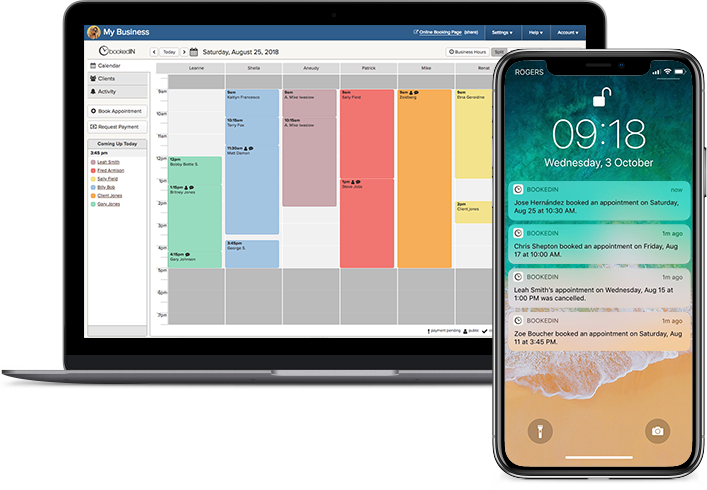
When you’re bouncing between your home shop, guest spots, and conventions, it’s easy to accidentally book two clients for the same day in different cities. That’s why your tattoo booking software should include a reliable calendar that shows your full schedule in one view.
For those using Bookedin, you can block off travel days, setup time, and teardown time so no one can book over them. Use color-coding or separate calendars for “Home shop,” “Guest spot,” and “Convention” so you can see where you are at a glance.
Also, add buffer time between appointments to handle cleaning, photos, and quick breaks. This prevents you from stacking sessions too tightly and running behind.
When everything is in one calendar, you don’t have to cross-check notebooks, DMs, and screenshots. You just open your calendar and see your entire month laid out clearly.
Automating Reminders and Client Messaging on the Road
When you’re traveling, you can’t sit on your phone sending reminders and directions all day. You need automated client messaging and reminders to do that for you.
So, make sure to set up automatic confirmation messages that include the shop or convention address, parking tips, and what clients should bring. Then, schedule reminders for 48 hours and 24 hours before the appointment.
With Bookedin, you can customize messages for each event, so your guest spot clients don’t get the same info as your home shop clients. If plans change, you can send a quick bulk message to everyone booked on a certain date. This keeps clients informed without you typing the same thing over and over.
Handling Walk-Ups and Same-Day Bookings at Conventions
Conventions are often overwhelming. You’re tattooing, talking, selling prints, and trying to keep track of who wants what and when.
A great tattoo booking system like Bookedin lets you handle walk-ups and same-day bookings without losing control. That way, when someone walks up, you can quickly check your calendar, see open slots, and book them on the spot. Add a quick service like “Convention flash – small” or “Convention custom – half day” with a set price and deposit.
Don’t forget to take clients’ info, lock in the time, and send them a confirmation and reminders right away. This keeps your day organized and prevents double-booking when three people ask for the same time slot.
Connecting Social Media, QR Codes, and Your Booking Page
Your social media and booth setup should all point to one place: your booking page.
For guest spots, pin a post with your dates, city, healed work, and a direct booking link. Add that same link to your bio and story highlights.
For conventions, print a QR code that opens your booking page and stick it on your banner, table, and portfolio. When someone stops by, they can scan and book without waiting to talk if you’re mid-tattoo.
With Bookedin, your booking page link stays the same, but you can update services and availability for each event. That means you don’t have to change links every time you travel. Everything funnels into one system, one calendar, and one client list.
Tracking Clients From Different Cities and Events
Over time, you’ll build a client base in different cities and at different conventions. Keeping track of who you tattooed where, and what you did, matters for touch-ups, repeat work, and future guest spots.
Your booking software should act as a client history system, not just a calendar. With Bookedin, every appointment is tied to a client profile that shows contact info, past services, notes, and which city or event they saw you at.
You can tag clients by city or convention, then send targeted messages about when you’re coming back. This turns one-time convention clients into long-term collectors.
You also avoid awkward “Have I tattooed you before?” moments, given that everything is logged, from deposits to designs, in one place you can pull up in seconds.
FAQ About Tattoo Booking for Guest Spots & Conventions
How far in advance should I open booking for a guest spot?
Open your booking page for a guest spot as soon as dates are confirmed, usually 4–8 weeks out. That gives locals time to plan and send references.
Close booking a few days before you travel so you can review all requests, finalize designs, and avoid last-minute chaos.
Can I use the same booking page for my home shop and conventions?
Yes. With the right software, you can run everything through one booking page while separating services and availability.
If you're using Bookedin, you can set different services and time blocks for home, guest, and convention work. Clients only see what’s actually available for the dates they pick.
What if a client misses their appointment while I’m traveling?
Stick to your written policy. If they no-show or cancel too late, keep the deposit as stated. Use automated reminders and clear client messaging to help avoid these situations.
When you’re traveling, your time is limited. Your booking rules should protect that time.
How do I keep my messages from getting out of control when I'm traveling?
Push everyone to your booking page. Put the link in your bio, stories, posts, and QR codes at the booth. Use booking questions to collect everything you need up front. Then rely on automated confirmations and reminders instead of answering the same questions in DMs all day.
About the Author

The Bookedin Team is made up of writers, marketers, and people who genuinely understand the day-to-day of running a service business. Our articles cover everything from scheduling and client management to marketing and business growth — because running a service business is no small feat.