How Tattoo Studios Manage Flash Day Bookings
Learning how tattoo studios manage flash day bookings successfully is the difference between a packed, profitable event and a stressful mess. With the right system, you control the flow, protect your artists’ time, and keep clients happy.
Why Flash Day Bookings Get Hectic Fast
Flash days look simple from the outside: Pick designs, post the sheet, and let people line up. Inside the shop, it’s different. You’re juggling walk-ins, pre-booked clients, deposits, and time estimates while trying to keep artists moving and clients calm.
One person shows up late, another brings a friend who wants in, someone else messages you on three platforms asking if they can “just squeeze in real quick.”
If you’re tracking all this on paper or in your head, things can spiral out of control. Overlaps happen. People wait too long. Artists rush or stay late. That’s why many studios move to structured systems like a tattoo booking software that can handle flash-specific rules, like shorter time slots, limited designs, and required deposits.
Setting Clear Flash Day Rules Before You Open Bookings
The best way to manage flash day bookings is to decide your rules before anyone can claim a spot. That means setting the design options, size limits, body placements, pricing, and time-per-piece for each artist.
If you let every client negotiate size, color, and placement on the fly, your schedule breaks. Decide if the flash is pre-drawn only or if small tweaks are allowed.
Set a firm date, start and end time, and how many pieces each artist can realistically do. Then, choose how people can book: online only, in-person only, or a mix.
Put all of these in one clear info post on your social media pages and website, and pin it. When people ask questions, you send them back to that post instead of re-explaining the rules all day.
Choosing a Booking System That Can Handle Flash Days
Flash days move fast, so your booking system has to be able to keep up. A solid setup lets clients grab a time slot, pay a deposit, and get confirmation without you touching every request.
Many studios use online booking tools built for tattoo shops so they can create a separate flash event with shorter time blocks and limited availability.
With Bookedin, for example, you can build a dedicated flash service, set custom durations, require deposits, and show only the times you want open.
Book a free demo & see how it works
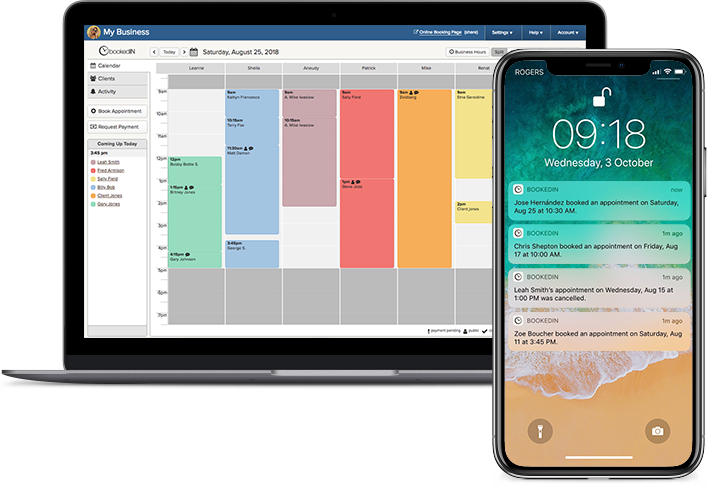
The calendar keeps all artists in one view, so you see who’s booked and who still has space. This cuts down on back-and-forth, double-booking, and “Did you get my message?” stress.
When your booking system does the heavy lifting, your team can focus on tattooing and in-person client care instead of playing receptionist all week.
Structuring Time Slots and Artist Capacity
Flash days can fall apart when time estimates are wrong. If you book every piece as a 30-minute slot but most designs actually take 45 minutes, your whole day runs late.
To prevent such situations, time a few test pieces or ask each artist for honest averages. Then, build your flash schedule around realistic time blocks with a small buffer.
Many studios use 45–60 minute slots for small flash and limit each artist to a set number of pieces per day. You can also block off short breaks every few hours so artists don’t burn out.
In your booking system, assign each flash service to specific artists and only open the number of slots they can handle. This keeps the line moving and prevents overbooking.
Handling Deposits, Pricing, and No-Shows
Flash days attract impulse buyers (or bookers, in this case). That’s good for volume but may also lead to no-shows. The solution? Requiring non-refundable deposits for pre-booked flash spots to filter out the flaky crowd.
Set a clear minimum, like $20–$50, and apply it toward the final price. Spell out your policy: how late is “too late,” what counts as a cancellation, and whether deposits transfer to another date.
Use your appointment scheduling system to collect deposits automatically when clients book, so you’re not chasing payments. For walk-ins, you can still take a small deposit when they claim a later slot that day. This keeps your calendar solid and reduces gaps when people disappear.
Make the rules public and consistent, so your staff doesn’t have to argue at the front desk.
Balancing Walk-Ins and Pre-Booked Flash
Some studios go all-in on pre-booked flash. Others love the energy of a line out the door. You can do both if you separate them accordingly.
One common setup is to reserve the morning for pre-booked flash appointments and leave the afternoon for walk-ins. Another option is to assign certain artists to booked slots and others to handle the line.
Either way, make sure to use your calendar to block off specific hours for each mode so you don’t accidentally double-book.
For walk-ins, keep a simple list with name, design choice, and estimated time. Give people a realistic return time instead of letting them crowd your lobby. Post updates on social when the list is full so people don’t drive over for nothing.
Using Client Messaging and Reminders To Cut Confusion
Most flash day headaches come from miscommunication. People forget their time, show up late, or bring extra friends who want in. Automated client messaging and reminders fix a lot of that.
With Bookedin, every flash booking can trigger confirmation messages plus reminder texts or emails before the appointment. You can customize these to include rules: Arrive 10 minutes early, bring ID, no extra guests, cash vs. card, and aftercare basics. This saves your staff from repeating the same speech all week.
If you need to adjust an artist’s schedule, you can message everyone on that day from one place instead of hunting through DMs. Clear, consistent communication keeps the day moving and reduces awkward conversations at the front desk.
Sign up & get a 14-day free trial
Managing the Day-Of Workflow in the Shop
On flash day, your booking system sets the plan, but your in-shop workflow keeps it alive. Start with a quick morning huddle so everyone knows the schedule, designs, and any special rules.
Print or display the day’s calendar where staff can see it. Assign one person to manage check-ins, payments, and questions so artists stay at their stations.
When a client arrives, confirm their design, placement, and price before they sit down. Mark them as arrived in your system so you can see who’s next.
If someone is late, you decide whether to bump them, move them, or fill the slot with a walk-in. Keep a simple whiteboard or digital list for walk-ins and last-minute adds. The goal is to keep artists tattooing and avoid bottlenecks at the front desk.
Using Waitlists and Cut-Off Times
Flash days almost always create more demand than you can handle. A simple waitlist system keeps that from turning into arguments at the door.
When your pre-booked slots fill, switch to a waitlist instead of hard “no” replies. Collect names, contact info, and preferred time windows. If someone cancels or no-shows, you pull from the waitlist in order.
Your booking software can help by showing gaps in the calendar so you know where to plug people in.
Set a clear cut-off time for new arrivals, like “No new sign-ups after 4 PM,” and post it at the shop and online. This keeps expectations realistic and protects your artists from being pressured into “just one more” at closing.
Reviewing Data After Each Flash Day
Every flash event gives you data you can use to make the next one smoother. After the dust settles, look at your calendar, deposits, and no-show rates.
How many slots did each artist actually complete? Were your time estimates accurate? Did certain designs take longer than expected?
Check how many people booked online versus walked in. Look at when the rush hit and when things slowed down.
If you’re using Bookedin, you can scan past days to see patterns in bookings and cancellations.
Use this info to adjust time slots, pricing, and rules for your next flash. Maybe you need longer blocks, higher deposits, or a stricter cut-off time. Treat each flash day like a test you refine, not a one-off event you forget.
FAQ About Managing Flash Day Bookings
How far in advance should I open flash day bookings?
Most studios open flash day bookings 1–2 weeks in advance. That’s enough time to fill the calendar without giving people so long that they forget.
If your shop has a big following, you might only need around three to five days. Watch how fast slots fill and adjust your lead time for future events.
Should flash days be appointment-only or walk-in only?
Both can work. Appointment-only gives you more control and less chaos. Walk-in-only creates hype but can be harder to manage.
Many shops blend the two: pre-booked in the morning, walk-ins later, or certain artists on appointments while others handle the line. Use your calendar to keep the two flows separate.
How much should I charge for flash day deposits?
Set deposits high enough to discourage no-shows but not so high that they scare off good clients. Many studios use $20–$50 per piece, applied to the final price.
Make it non-refundable and spell out your rules clearly on your booking page and info posts so there are no surprises.
What if clients want to change the flash design on the day?
Decide your policy before you open bookings. Most shops keep flash days strict: no major changes, maybe small tweaks only.
Bigger changes usually mean more time, which breaks your schedule. Put this rule in your description, reminders, and at the front desk so staff can point to it instead of debating.
How do I handle clients who show up late to their flash slot?
Set a clear grace period, like 10–15 minutes. After that, you can either shorten the session, move them to a later gap, or mark it as a no-show and keep the deposit.
Whatever you choose, apply it consistently and include it in your booking rules and reminder messages.