How To Manage Multiple Tattoo Artists With One Booking System
Why Use a Single Booking System for a Multi-Artist Tattoo Studio?
Running several artists through scattered DMs, texts, and paper notes guarantees chaos. Clients message your shop page, individual artists, and sometimes your personal account. Things get lost. You double-book. Someone forgets to collect a deposit.
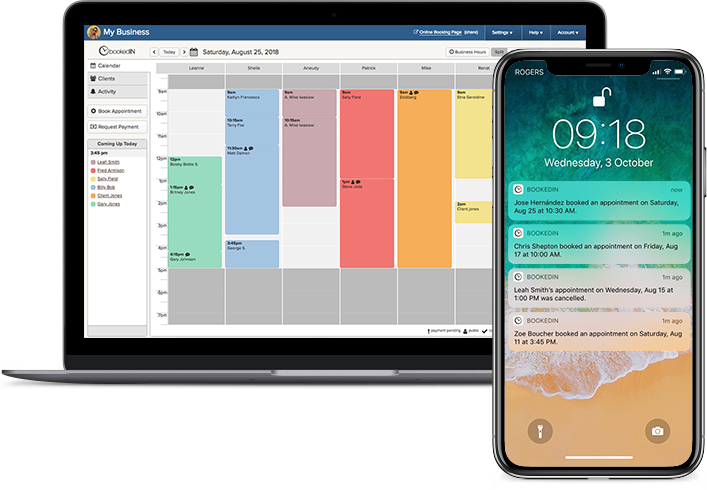
A single booking system pulls all of that into one place. Every artist sees their own calendar, but the shop still has a full view of the day. You can control hours, break times, and how far in advance people can book.
Plus, when someone joins or leaves, you simply have to adjust their profile instead of rebuilding your whole process. The shop keeps running without much of a fuss.
With a tool like Bookedin’s tattoo booking software, clients pick their artist, service, and time without you lifting a finger.
Setting Up Artist Profiles and Schedules
To manage multiple tattoo artists with one booking system, start by building clear profiles for each person. Add their name, specialty, and working hours so clients know exactly who they’re booking.
Set different availability for full-day sessions, flash, walk-ins, or consultations. If you’re using Bookedin, each artist can have their own calendar inside the same account, so you see the whole shop at a glance.
You can also block off time for drawing, lunch, or conventions. Use color-coding by artist or service to spot gaps fast.
Make sure every artist agrees on how far in advance clients can book them and how last-minute cancellations are handled.
Once profiles and hours are set, test-book a few fake appointments. Check if each artist appears correctly and that clients can’t book outside the approved times.
Designing Services and Pricing for Multiple Artists
When several artists share one booking system, your service list needs to be tight. Start by listing core services: small black-and-gray, color pieces, half-day, full-day, touch-ups, and consultations.
Then, decide which artists offer which services. Some may not want small walk-ins. Others may focus only on large custom work. With Bookedin, you can assign services to specific artists.
Set clear pricing or starting rates, and note if the final cost depends on size and detail. Add time estimates that match real life. If your “small piece” slot is always running over, extend the default duration. This prevents a chain reaction of late appointments.
Keep descriptions simple but clear so clients know what to choose without messaging you multiple times.
Also, consider reviewing services with your team every few months. Drop what no one books, adjust times, and add new options when your artists shift focus.
Letting Clients Choose the Right Artist
Clients often come in with a specific style in mind, not a specific artist. Your booking system should help them find the right match without having to message you multiple times.
Use each artist’s profile to highlight specialties like realism, traditional, fine line, watercolor, and more. Add a short bio and a link to their portfolio or social.
On your booking page, let clients filter by artist or by service. If someone picks “black-and-gray realism,” only show artists who actually want that work. This keeps your team happy and your clients satisfied.
Automating Reminders and Client Messaging
When your tattoo studio has multiple artists, handling appointment scheduling via manual messaging isn’t the way to go. Someone always forgets to send a reminder or confirm a time. Your booking system should handle these automatically.
Set up text and email reminders that go out at set times before the appointment, like 48 hours and 24 hours. Include address, parking info, prep instructions, and your deposit policy.
With Bookedin,you can also send bulk messages for shop-wide updates, like policy changes or holiday hours, without blasting from personal accounts.
Overall, automated communication keeps clients informed and reduces no-shows, while freeing your artists from constant back-and-forth.
Preventing Double-Booking and Overlapping Sessions
If you have multiple tattoo artists at your shop, double-booking can sneak in fast, especially when you mix walk-ins, long sessions, and touch-ups. Your booking system must block overlapping times and respect each artist’s calendar.
If you allow walk-ins, create specific “walk-in blocks” on certain artists’ calendars so you don’t accidentally stack them on top of full-day pieces.
Don’t forget to add buffer times between appointments for cleanup and setup. A two-hour tattoo might need a 15-minute buffer so the next client isn’t waiting in the lobby while you’re still wiping down. If two or more artists share the same station, set rules so only one artist can book that station at a time.
Tracking Performance by Artist
One booking system for multiple tattoo artists gives you useful data. Instead of guessing who’s busy, you can see actual numbers. Look at total appointments, revenue, no-shows, and average session length by artist.
With Bookedin, you can pull reports that show who’s booked out weeks ahead and who has gaps. This helps with staffing, marketing, and pricing decisions.
If one artist is always slammed, maybe it’s time to raise their rates or adjust their hours. If another has slow days, you can push promos or give them more walk-ins.
Track which services each artist sells the most. That tells you where to focus training or advertising.
Data also helps settle internal questions. You’re not arguing about who’s “busier.” You’re looking at clear numbers.
Training Your Team To Use the Booking System
Even the best booking system fails if your team ignores it. Training is non-negotiable when you manage multiple artists. Start with a simple rule: If it’s not on the calendar, it doesn’t exist.
Walk each artist through how to check their schedule, add notes, block time, and review client messaging. Show them how reminders and deposits work so they trust the tool. Create a short written guide with screenshots for common tasks.
Plus, with Bookedin’s Staff Security Roles feature, you can decide who can edit shop-wide settings versus just their own calendar.
Overall, keep the process simple. The goal is to make their day easier, not add extra admin work. Once artists see fewer no-shows and cleaner days, they’ll stick with it.
FAQ
Can multiple artists share one booking account without mixing schedules?
Yes. With a system like Bookedin, each artist has their own calendar under one shop account.
The shop sees everything, but artists only see what you allow. Appointments stay separated, and the system blocks conflicts automatically.
What if an artist has different hours every week?
You can set custom availability week by week. In Bookedin, adjust each artist’s calendar for travel, guest spots, or changing days off. Clients only see the times you open, so no one can book when that artist is unavailable.
Do I need a front desk person to run the system?
Not really, but it can help in busy shops. Many studios run Bookedin with artists managing their own calendars. A front desk person can handle walk-ins, phone calls, and quick changes, while the system manages the rest automatically.
How do I handle deposits for different artists?
Set standard deposit rules at the shop level, then adjust by service if needed. For example, all full-day sessions require a higher deposit, no matter which artist. Collect deposits through your booking page so money never depends on personal DMs or cash drop-ins.