Tattoo Studio Calendar Management: A Guide for Busy Shops
Running a busy shop means your availability fills up fast, clients message from left and right, and walk-ins collide with long-running appointments. Effective tattoo studio calendar management is what helps you hold everything together.
This guide breaks down practical, no-nonsense tips for how to manage your tattoo studio calendar. We’ll cover how to structure your week, handle walk-ins, manage deposits, reduce no-shows, and use tools like online schedulers to keep everything under control.
Why Your Tattoo Studio Calendar Is Your Most Important Tool
When your schedule lives only in texts, DMs, and your head, you’re bound to lose track of time, double-book, and forget details that matter.
That’s why you need a clean, centralized tattoo studio calendar that shows you exactly who’s coming in, what they’re getting, and how long it will take. The result? Fewer surprises and more control over your day.
You can have such a calendar using a dedicated tattoo booking software, where your clients can self-book, pay deposits, and get automatic reminders. Instead of being glued to your phone all day, you can plan your time around large pieces, touch-ups, and walk-ins.
Setting Up a Clean, Centralized Tattoo Studio Calendar
A strong calendar system starts with one rule: Everything goes in one place. Use a single calendar for every artist, every room, and every appointment type.
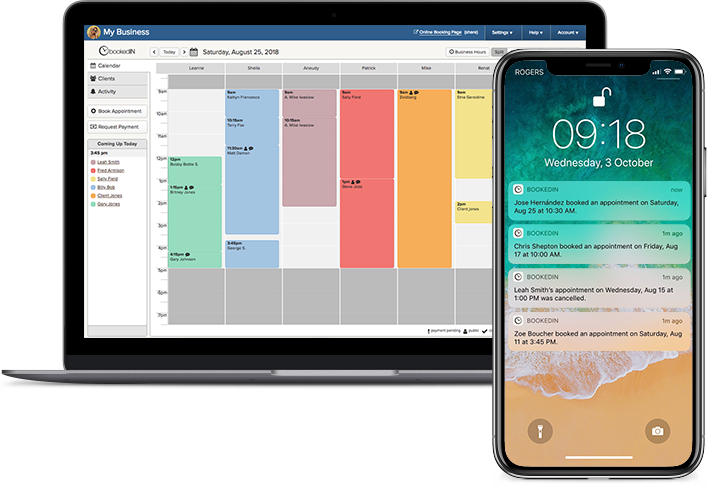
With a tool like Bookedin, you can create separate calendars per artist but still see the whole shop in one view. Set clear appointment types with realistic time blocks: small flash, medium custom, large custom, touch-up, consult, and so on.
Add built-in buffer time for setup, cleanup, and photos so you won’t have to rush prepping for the next client.
Make sure every booking includes key details: size, placement, style, reference images, and whether a stencil is ready. This keeps your day from turning into a guessing game when the client walks in.
Time Blocking To Structure Your Week Properly
Time blocking gives your week a good foundation and makes your income more stable because your schedule follows a consistent pattern.
Instead of letting appointments fall anywhere, you pre-assign blocks for different work: big pieces in the morning when you’re fresh, smaller tattoos or walk-ins later, consults on specific days, and admin or drawing time where you won’t be interrupted.
In your calendar, mark these as recurring blocks so they repeat weekly. When clients book online, they only see the slots you want them to see, not every open minute.
This keeps you from stacking three full-day pieces back-to-back or filling your only drawing time with a tiny walk-in.
Balancing Walk-Ins and Appointments
Walk-ins bring cash and new clients, but they can wreck a carefully planned day if you don’t keep these under control. The key is to plan accordingly for walk-ins instead of just “seeing what happens.”
Use your calendar to create daily or weekly walk-in time blocks, either for the whole shop or specific artists. Once those blocks are full, you stop taking more for that day.
Train your front desk or whoever answers the phone to check the calendar first, then offer the next available walk-in window instead of “just come by.”
For busy days, you can convert walk-ins into quick consultations and book them properly for another time. This keeps your booked clients from getting pushed back and stops you from tattooing three hours past close because you said yes to everything.
Using Deposits and Reminders To Cut No-Shows
No-shows and last-minute cancellations can significantly affect your income, and the best way to prevent these is by combining deposits with strong reminders.
Set a clear deposit policy for all bookings over a certain size or price. Collect deposits at the time of booking through your booking page so you’re not chasing payments later.
Also, spell out your cancellation and reschedule rules in writing and include them in your confirmation messages.
Then, set up automated reminders (24–72 hours before the appointment) through client messaging so clients can’t say they forgot. With Bookedin, you can set text and email reminders that go out automatically, which means you don’t have to remember to send anything.
When people have money down and multiple reminders, they’re far more likely to show up or at least give you enough notice to refill the spot if they suddenly can’t make it.
Managing Multiple Artists and Rooms in One View
In a multi-artist studio, your shop calendar is more prone to chaos. One artist runs over, another has a no-show, and suddenly the shared room is double-booked.
The fix is a shared studio calendar that shows every artist and room in one place. This keeps you and your entire staff on the same page always.
In Bookedin, each artist can have their own calendar, but you can view them side by side. Assign services to specific artists and rooms so you don’t accidentally book two full-day pieces in the same space.
Use color-coding for artists or appointment types so you can scan the day in seconds. Give each artist access to their own schedule via app, so they can check bookings, send client messaging, and adjust availability without going through the front desk.
Handling Reschedules, Cancellations, and Last-Minute Gaps
Reschedules and cancellations are unavoidable, but they don’t have to wreck your day. The key is to build a simple reschedule workflow into your calendar system.
First, set a cutoff window in your policy, like 24–48 hours, where deposits become non-refundable. When a client cancels within that window, mark the slot as open and immediately look at your waitlist or recent inquiries.
Use client messaging to send a quick blast to a few clients who wanted earlier dates. For same-day gaps, have a short list of “flex clients” who live nearby and are happy to come in on short notice.
You might also want to track how often certain clients cancel or reschedule. If it becomes a pattern, require higher deposits or limit their booking options.
Using Calendar Notes and Photos To Stay Prepared
A clean schedule is good, but a detailed schedule is better. Use calendar notes to store everything you need for each session: reference links, healed photos, stencil status, allergies, and any special instructions.
Attach or link to images so you’re not digging through your camera roll five minutes before the client arrives. For multi-session pieces, note what was done last time and what’s planned next. This keeps you from repeating work or wasting time re-planning.
For those who use Bookedin, you can keep client details and appointment history together, so when someone books again, you already know their style, pain tolerance, and how long they usually sit.
Over time, these notes make your estimates more accurate and your sessions smoother because you’re not starting from zero every time.
Tattoo Studio Calendar Management: FAQ
How far in advance should I let clients book?
Most studios do well allowing bookings 1–3 months out. That keeps your calendar full but not locked for half a year.
In your booking software, set a maximum booking window so clients can’t grab dates too far ahead. If you’re in high demand, keep a shorter window and use a waitlist for future openings.
Should I take deposits for every tattoo?
You don’t have to, but it’s smart to take deposits for anything custom or over a certain price or time.
Small flash or same-day walk-ins might not need one. Set a minimum deposit amount and stick to it. Collect deposits through your booking page so it’s automatic and tracked with the appointment.
How do I stop clients from messaging me on every platform?
Set one main channel and repeat it everywhere. In your bio, website, and auto-replies, direct people to your booking page or studio number.
Use client messaging inside your booking system for appointment details. Over time, clients learn that if they want a spot, they have to go through your calendar, not your personal DMs.
What’s the best way to handle late clients?
Decide on a late policy and add it to your confirmations and reminders. For example, after 15 minutes late, the session is shortened; after 30 minutes, it’s cancelled and the deposit is forfeited.
Note late arrivals in the calendar. If someone is often late, require earlier times or larger deposits to protect your schedule.
How often should I review and adjust my tattoo studio schedule?
Do a quick review weekly and a deeper one monthly. Look at where you ran over, where you had gaps, and which days felt overloaded.
Adjust appointment lengths, time blocks, and walk-in capacity based on what actually happened. Your calendar should evolve with your workload, not stay stuck on your first guess.