How To Automate Tattoo Consultation Scheduling
This article covers how to automate your tattoo consultation booking process, from inquiries to confirmed appointments.
Why Should You Automate Tattoo Consultation Booking?
Handling bookings for tattoo consultations manually looks simple until messages in your inbox pile up. You answer the same questions all day. You chase people for deposits. You forget who booked when because it’s spread across DMs, texts, and scraps of paper.
Those can then lead to double-booking, missed messages, and clients showing up at the wrong time.
Automation fixes this by giving clients a clear path: They see your availability, pick a time, fill out your questions, prepay a fee (if needed), and get instant confirmation.
You set the rules once and let the system run — all you need is the right tattoo booking software that has your calendar, reminders, and client messaging in one place.
6 Tips for Streamlining Your Tattoo Consultation Booking
Follow these steps to ensure your tattoo consultation booking process flows smoothly.
1. Map your ideal consultation workflow first
Figure out how you want the tattoo consultation booking to work from start to finish — that is, what happens from the moment someone finds you to the moment they leave the consultation.
Decide which consultations need to be in-person, and which can be done via video or quick phone calls. Set how long each type should be and how far in advance people can book.
Decide when you want breaks between consults and tattoos, so you’re not rushing.
List the questions you need answered before you say yes: placement, size, style, budget, references, medical issues, and more. Also, decide if you want the consultation fee (if any) to be paid in advance and what your cancellation rules are.
Once all these are clear, you can set everything up inside a system like Bookedin so it runs the same way every time without you re-explaining it.
2. Set up online booking for consultations
Once your workflow is mapped, you need to provide clients with an efficient way to book anytime, anywhere. That’s where an online tattoo consultation scheduling tool comes in.
If you’re using Bookedin, you can create specific services like “Flash consultation,” “Custom sleeve consultation,” or “Cover-up consultation.” You also get to set the length, price or free, and whether prepayment is required.
Then, you connect those services to your booking page so clients can see real-time availability without messaging you. You control which days and times are open for consultations versus tattoo sessions.
Additionally, you can limit how far in advance people can book, so your calendar doesn’t get fully booked way too soon.
Once set, your booking page link should be included in your Instagram bio, website, Google profile, and auto-replies. That way, clients can easily go to that page once they find you online.
3. Use smart intake questions to filter and prepare
Good intake questions save you from wasted consultations and bad fits. On your tattoo shop booking page, add custom fields to each consultation service.
Ask for placement, approximate size, style, color or black and gray, budget range, and any reference images. Include health questions you legally need to know before tattooing.
For cover-ups, ask for clear photos of the existing tattoo in good lighting. As for larger projects, ask if they’re open to your style and ideas so you avoid clients who want you to copy another artist.
Keep questions short but specific so you can scan a booking and know if it’s worth your time.
With Bookedin, all this info lands in the client profile attached to the appointment, so you can prepare faster and you won’t have to dig through DMs before they walk in.
4. Consider including deposit and payment rules
No-shows and last-minute cancellations usually happen when there’s no money on the line. Decide which consultations require a deposit or prepayment, and how much.
For paid consultations, you can charge the full amount up front. As for free consultations, you might still take a small, non-refundable deposit that goes toward the tattoo if they book.
With Bookedin, you attach deposits to specific services so clients must pay when they book on your booking page. The system handles the payment and logs it in their profile.
You set your refund or reschedule rules once and include them in the booking policy text. That way, when someone cancels late, you’re covered, and there’s no argument about what you said beforehand.
5. Utilize automated reminders and client messaging
Some people can forget appointments easily. They get busy, lose track of time, or forget what they booked weeks ago. Automated reminders and client messaging keep your tattoo consultation booking schedule tight without you sending manual texts.
For those using Bookedin, you can set when reminders go out. For example, one confirmation email right after booking, one reminder 24 hours before, and one reminder six hours before.
You can eve3n customize the message with your shop rules, parking tips, and what they should bring. Also, you can send automatic follow-ups after the consultation with next steps or a link to book the actual tattoo.
All messages go out based on the calendar, so if someone reschedules, the reminders adjust automatically. This cuts down on no-shows and “I forgot” excuses and keeps your day predictable.
6. Sync consultations with your shop schedule
Automating you tattoo consultation booking process only works if it fits your real work rhythm. You don’t want consultations dropped in the middle of long tattoo sessions or during your drawing time.
In your booking system, block out your main tattoo hours, lunch, and cleanup time. Then, open specific windows for consultations, like two afternoons a week or certain mornings.
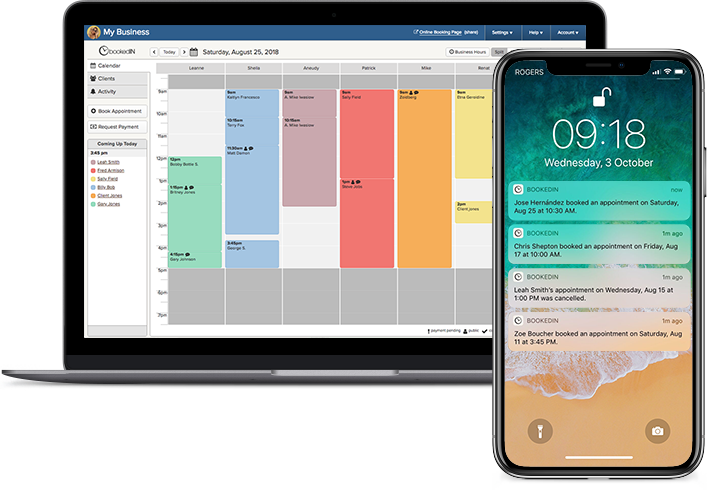
With Bookedin, your calendar shows everything in one view, so you can see consults, tattoos, and personal time together. You can set buffer time before and after consults so you’re not rushing from one client to the next.
If you work in a shop with multiple tattoo artists, each artist can have their own calendar but share the same booking page, so clients pick who they want without the front desk juggling calls.
This goes to show how, when your calendar is structured, consultations support your tattoo work instead of interrupting it. You stay in control of your day while clients still get easy access to your schedule.
Tattoo Consultation Booking FAQ
Can I still approve consultations manually if I use online booking?
Yes. You can set your tattoo consultation booking system to accept bookings automatically or require approval. Many artists let standard consults auto-approve but manually review large projects or cover-ups.
With Bookedin, you can see the intake answers first, then approve, decline, or suggest a different time. That way you keep control over who gets on your calendar while still avoiding endless back-and-forth messages.
What if my schedule changes often?
Use your calendar as the source of truth. When something changes, block off time in your booking system instead of trying to remember it. Bookedin updates your booking page in real time, so clients only see what’s actually available.
If you need to move a consultation, you drag it to a new time and the system sends updated reminders. This keeps your schedule flexible without turning it into chaos.
How do I start automating tattoo consultation booking without overdoing it?
Start small. Set up one basic consultation service in a system like Bookedin with a clear duration, a simple intake form, and automatic confirmations.
Share the booking page link in your bio and auto-replies. Once that feels smooth, add deposits, more consultation types, and extra reminders.
You don’t need every feature on day one. Get the core booking flow working, then layer on more automation as you see where you’re still wasting time.