Tattoo Studio CRM: What To Track & Why It Matters
Tattoo studio CRM (customer relationship management) system is not about having some fancy software, but rather, tracking the right info on clients that’ll help you run your shop more effectively.
When you know exactly who your clients are, what they book, how often they return, and how much they spend, you can fill your calendar with better work and fewer headaches.
This guide breaks down what to track in your tattoo studio CRM and how to use it to cut no-shows and fill your calendar.
Key Takeaways
- Track client contact, consent, and health info in one secure CRM system.
- Use booking and visit history to spot loyal clients and high-value work.
- Monitor no-shows, cancellations, and deposits to protect your time.
- Tag clients by style, artist, and budget to book better-fit appointments.
- Use reminders and follow-ups to boost rebookings and reviews.
- Let tools like Bookedin automate the boring admin so you can tattoo.
What a Tattoo Studio CRM Actually Is
A tattoo studio CRM is a system where you have client data, appointments, and communication in one clean place, so you can use all those to make better decisions.
It might be a notebook, a spreadsheet, or, more realistically, a dedicated scheduling software for your tattoo shop that combines a calendar, client profiles, and messaging.
The key is that it tracks every interaction: inquiries, consultations, deposits, appointments, aftercare questions, and rebookings. Instead of hunting through DMs, texts, and paper forms, you open one screen and see the full story for each client.
A proper CRM for tattoo studios also connects to your booking page, so when someone books online, their info, consent forms, and reminders are all tied to their profile.
Think of your tattoo studio CRM as the brain of your shop. It remembers everything about your clients, keeps things organized, and makes sure nothing important slips through the cracks when you are focused on providing services.
Basic Client Data You Should Always Track
Client profiles are the heart of any tattoo studio CRM. At minimum, you want full name, phone, email, and preferred contact method, but that is just the start.
You should also track health and consent forms, ID verification, allergies, medications, and any healing issues from past work. Add notes about pain tolerance, communication style, and whether they tend to run late or reschedule.
Store reference photos, healed pics, and copies of signed waivers under the same profile. When this info is complete and easy to find, you spend less time asking repeat questions and more time tattooing.
It also protects you legally, since you can quickly pull up signed forms and medical disclosures if there is ever a problem.
When you open a client profile, your tattoo studio CRM should let you instantly see who the client is, what service they’ve gotten previously (if any), and what to watch for next time — all without digging through messages or paper folders.
Booking History and Visit Patterns
Tracking booking history is where a tattoo studio CRM starts to really pay off. Every appointment, from the first consultation to final touch-up, should be logged to the same client profile with date, time, artist, and service type.
Over time, you see patterns: who books sleeves, who only does small flash, who always comes back for more, and so on. You can spot high-value repeat clients, seasonal rushes, and slow weeks that need promotion.
A good CRM shows you how far in advance people book, how often they reschedule, and which days or artists are overbooked. This helps you adjust hours, pricing, and minimums based on real data, not gut feeling.
When your calendar is tied directly to your CRM, you can quickly filter by client, style, or artist and see exactly how your time is being used.
No-Shows, Cancellations, and Deposits
A tattoo studio CRM should track every missed appointment, late cancellation, and deposit so you can see who respects your time and who does not.
For each booking, log whether a deposit was paid, how much, and what your policy is if they cancel. Over a few months, you will see clear patterns: certain days with more no-shows, certain services that attract more flakes, or specific clients who repeatedly waste slots.
With this data, you can tighten your policies, require deposits for certain services, or adjust the timing for sending reminders.
When your CRM and booking system are connected, deposits, cancellations, and rebookings are all tracked automatically, so you do not have to chase people or do math at the end of the day.
Style, Placement, and Budget Preferences
Good CRM data helps you match the right clients to the right artist and project. That’s why for each client, you should track their preferred style, placement, and budget range.
Use tags like “black and gray,” “traditional,” “fine line,” “color realism,” or “cover-up” so you can filter quickly. Note if they prefer weekday mornings, evenings, or weekends. Add info on pain tolerance, whether they sit well for long sessions, and how they handle aftercare.
That way, when new inquiries come in, you can instantly see who is a good fit for a large custom piece versus a quick walk-in. This keeps artists working on the kind of tattoos they do best and reduces awkward price conversations.
Communication, Reminders, and Follow-Ups
Every message you send or receive about a booking is valuable data. Your tattoo studio CRM should log client messaging, including consult questions, quote details, and aftercare instructions.
When this is tied to automated reminders, you’re less likely to get no-shows or “What time is my appointment again?” texts. Track which clients open messages, confirm appointments, or ignore reminders.
After each session, schedule a follow-up message for healed photos, touch-up offers, or review requests. Over time, you will see which follow-ups bring people back and which are a waste.
Tools like Bookedin connect client messaging, reminders, and your calendar, so every message is linked to a specific appointment and client profile without extra work.
Book a free demo & see how it works
Revenue, Spend per Client, and Artist Performance
A tattoo studio CRM is not just about names and dates. It should also track money.
For each client, log total spend, average ticket size, and how often they book. This shows you your most profitable clients, not just the ones who talk the most.
Break revenue down by artist, style, and service type to see what actually pays. Maybe small flash fills slow days, but large custom pieces drive most profit. Track tips, upsells (aftercare products, merch), and how deposits convert into completed sessions, too.
When your CRM is connected to your booking and payment flow, you can pull simple reports without spreadsheets. This helps you decide where to raise rates, which services to push, and which ones to drop because they waste time.
How Bookedin Works as a Tattoo Studio CRM
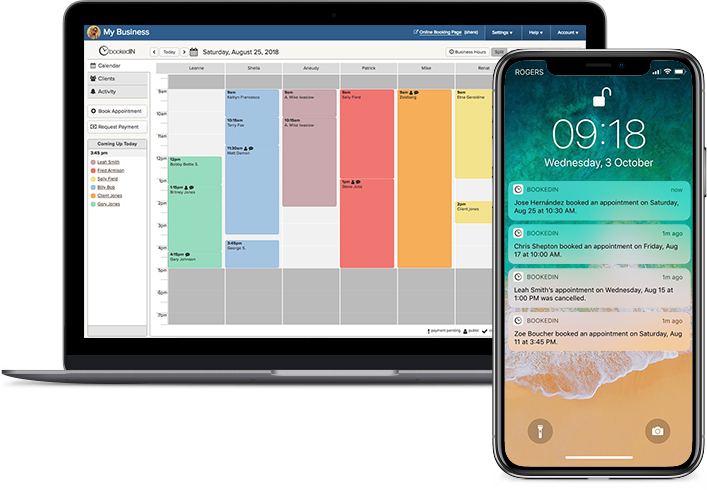
Bookedin is built to help ensure your tattoo shop runs smoothly by acting as your tattoo studio CRM in the background. When a client books through your online booking page, their info goes straight into your client list, tied to the correct artist and service.
The calendar shows every appointment, consult, and touch-up in one view, with deposits and durations attached. Appointment confirmations and reminders for clients are automated, and you can also opt to message clients directly for post-session follow-ups.
Bookedin builds a full history on each client, covering their visits, no-shows, cancellations, notes, and payments. You can quickly see who’s regular, who spends the most, and more. Instead of juggling apps and paper, you get one system that tracks every important info.
P.S. — If you’re on the fence, you can sign up for Bookedin for free and test out all its features with a 14-day trial.
Commonly Asked Questions
What's the most important thing to track in a tattoo studio CRM?
The most important thing is complete, accurate client profiles tied to every appointment.
That means contact info, consent and health forms, notes, and full booking history. Once those are solid, tracking no-shows, deposits, and spend per client becomes much easier and more useful.
Do I really need CRM software, or can I use a notebook?
You can start with a notebook or spreadsheet, but you'll need something more efficient as your shop grows. A tool like Bookedin connects your calendar, booking page, client messaging, and reminders in one place.
That means less manual work, fewer mistakes, and better data you can actually use.
Is client data in a tattoo studio CRM secure?
With a proper system, yes. A dedicated CRM or booking platform stores data in a secure, backed-up environment instead of on random phones or paper forms.
That protects client privacy and makes it easier to pull records if you ever need them for legal or health reasons.
How long does it take to set up a tattoo studio CRM?
Basic setup can be done in a day or two. Import your existing clients, connect your booking process, and create a few templates for forms and messages.
The system improves over time as you add tags, notes, and better workflows, but you can start getting value almost immediately.
Can multiple tattoo artists at my shop share the same CRM?
Yes. A shared tattoo studio CRM lets each artist see their own calendar, clients, and notes, while the shop owner can see everything.
This keeps data consistent, avoids double-booking, and makes it easier to track performance by artist without separate systems.