8 Best Scheduling Software for Tattoo Studios in 2026
If you’re running a tattoo shop, it’s important to have an appointment booking tool that’ll not only keep your schedule organized but also help fill open slots, improve the client experience, and even boost your revenue.
Below is a list of the best scheduling software for tattoo studios that are worth considering. Some are tattoo-specific platforms, while others are widely used scheduling tools that still work well for your kind of business.
1. Bookedin

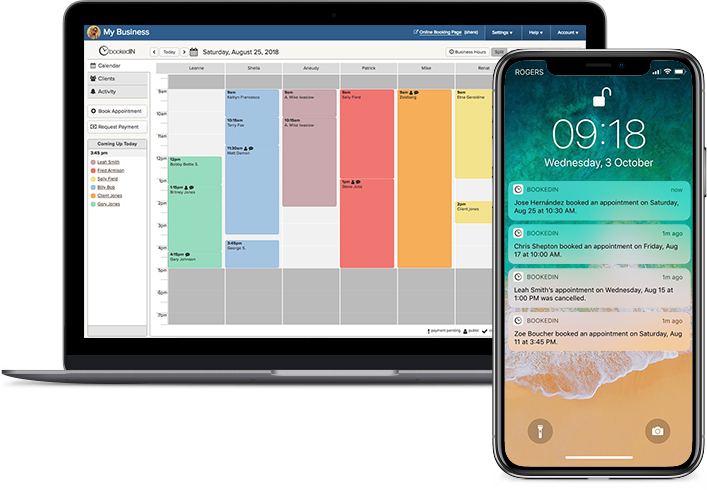
Bookedin works especially well for tattoo studios because it keeps scheduling organized across multiple artists without turning into a messy spreadsheet situation. You get one place to see what’s booked, what’s paid, and what still needs follow-up.
Plus, it works well for tattoo studios expecting to scale operations in the future. You can give staff their own logins and control who can access what, which is especially important once you’re not the only one handling the schedule.
Book a free demo & see how it works
Notable features you should know about:
- Custom booking forms: When clients book, you can ask intake questions about placement, size, budget notes, and more.
- Request form option: If you’d rather filter appointment requests to see if the potential client’s preferences are a good fit for your team, you can opt for this instead of a booking form.
- Deposits and prepayment: You can require clients to pay a deposit up front to confirm the appointment (with Stripe, Square, or PayPal options).
- Automated confirmations and reminders: Send up to three client reminders via text or email, so they’re less likely to forget or show up unprepared.
- Multi-calendar sync: Sync your Bookedin calendar with personal calendars you and your team may be using (like Google, iCloud, Outlook/Office 365, and Exchange) so availability stays updated.
- Staff access controls: Give an individual log-in and assign an access permission level to each staff member, from your receptionist to tattoo artists. No need to share passwords for the shop’s account!
Compare features & pricing plans
2. SimplyBook.me

SimplyBook.me is a good fit if your priority is making booking easy to access everywhere clients find you — from your website and booking page, to social media and even Google.
Although it’s not exactly tattoo-specific, it does offer plenty of booking features and add-ons if you want to build a more “self-serve” client experience.
Notable features you should know about:
- Multiple locations: Manage bookings across more than one location, which comes in handy for studios with two addresses or guest spots.
- Coupons and gift cards: Run promos or offer gift cards directly through the booking system.
- Packages: Bundle services (and even products/add-ons) into packages clients can purchase.
- Customizable booking site + widgets: Use a booking website, embed widgets, and customize the look/wording.
3. Porter
Similarly, Porter positions itself as an all-in-one system built specifically for tattoo studios, going beyond appointment slots.
The big difference is how tightly it connects booking to payments, client tracking, marketing, and even artist payouts, which can be a big deal if your weekly “who gets paid what” process is currently a spreadsheet situation.
Notable features you should know about:
- Studio-wide platform: Combines bookings, POS/payments, CRM, marketing, and reporting in one tool.
- Automated artist payouts: Set commission splits and have payments automatically distributed between shop and artist.
- POS built for studios: Take payments through Porter’s POS and keep deposits, cards, and checkout tied to appointments.
- Automated reminders and follow-ups: Sends reminders and even maybe follow up to request reviews.
4. Acuity Scheduling

Acuity is a well-known scheduling tool that works best when your studio relies heavily on consult-style workflows or needs detailed forms before confirming anything.
It’s not tattoo-specific, but it’s a good option for studios that want a customizable booking setup without switching to a fully tattoo-native platform.
Notable features you should know about:
- Client intake forms and agreements: Create forms and tailor them by appointment type, which can be helpful if your consultations and various sessions require different questions.
- E-gift certificates and packages: You can use this to sell e-gift certificates, packages, or subscriptions depending on how you run promos or repeat booking.
- Strong scheduling controls: Manage availability rules and booking limits so your calendar doesn’t get messy.
- Waitlist workaround: When you’re fully booked, you can direct clients to a waitlist form so you’ve got a list of people to contact if a spot opens up.
5. TattooGenda

TattooGenda is designed for tattoo studios that want a more structured booking flow from start to finish.
It can also help with the post-appointment side (like aftercare messages and client documentation) so you’re not fixing everything manually per client.
Notable features you should know about:
- Deposit reminders and automatic cancellation: Automate deposit follow-ups and, if you choose, cancel bookings when deposits aren’t paid.
- Aftercare email automation: You can tailor and schedule an automated email that sends aftercare info plus completed documentation once steps are done.
- Ink documentation (notably EU-friendly): Record exactly which inks were used (including brand and batch/lot details) and email that record to the client for easy traceability and paperwork.
- Multi-session scheduling: Clients can book multiple dates in one go, which is especially useful for larger pieces or custom projects that need to be split across several sessions.
6. InkDesk

InkDesk is another tattoo-focused software that emphasizes keeping scheduling and client communication in one place.
If your biggest pain point is admin time, InkDesk is built around reducing that load so you’re not constantly context-switching — without having to resort to a complex, heavy studio management system.
Notable features you should know about:
- Organized reference images: You can store reference photos alongside the client thread so you’re not digging through DMs or camera rolls.
- Email templates: Save and reuse templates for common replies (e.g., pricing info, prep instructions, reschedule rules, aftercare follow-ups).
- Centralized inbox (email-based): Keep all client conversations in one place, and clients can reply straight from their own inbox; no need for them to join a separate chat link.
- Client history and project timelines: Store client history and track project timelines so you can more easily manage tattoo pieces that require multiple sessions.
7. Vagaro
Vagaro is often used by appointment-based businesses that want booking plus extra “shop-running” tools in the same system.
It covers the basics tattoo studios need (e.g., online booking, intake forms, and payments) in one place. If you decide you want more later, you can expand into additional business tools without switching platforms.
Notable features you should know about:
- Tattoo studio positioning: Built and marketed for tattoo artists, not just generic services.
- Shop operations-focused tools: Keep tabs on inventory and set up payroll/commission rules, both especially handy if you’re paying multiple artists or contractors.
- Client messaging and marketing: Automate appointment confirmations and reminders, and run email or text campaign blasts when you want to fill openings or encourage clients to come back.
- Packages and memberships: Offer prepaid packages or memberships so clients can pay ahead for a set number of sessions or recurring visits.
- Retail tracking: Track product sales (e.g., aftercare, merch, jewelry) alongside appointments so everything lives in one system.
8. Square Appointments

This appointment booking software makes the most sense if your tattoo business already uses Square for payments — that, or you simply want everything tied to a checkout system that’s familiar to most clients.
Where Square Appointments really helps is policy enforcement. You can require a card on file, set cancellation rules, and take prepayment for certain services, which makes your shop schedule a lot less vulnerable to last-minute flakes.
Notable features you should know about:
- Card-on-file or prepayment policies: Set policies like holding a card on file or requiring full prepayment (great for no-show protection).
- Custom cancellation rules: Set your cutoff window and control whether clients can cancel/reschedule online.
- Fits naturally with Square checkout: If Square is already your POS, keeping appointments and payment rules under one roof is simpler.
- Staff schedules and availability controls: Set staff booking availability weekly and manage exceptions like vacations or one-off schedule changes.
Also read: 7 Common Tattoo Booking Mistakes & How To Prevent Them
Final Word
When deciding on what scheduling software to get for your tattoo studio, it’s important to know what your priorities are: Do you need deposits to cut no-shows? Detailed intake forms for more complex pieces? A clean multi-artist calendar that stays accurate without constant fixes?
If you need more help figuring out which features matter most for your workflow, check out our guide to choosing the best scheduling software for your tattoo studio.
P.S. — If Bookedin ends up being your top pick, you get a 14-day free trial when you sign up.