How To Choose the Right Tattoo Booking App
A big part of managing your tattoo studio well is having an effective appointment booking tool that’ll make your life easier.
That’s why we’re here to show you how to choose a tattoo booking app by listing exactly what features to prioritize — whether you’re working solo or alongside other tattoo artists.
12 Things To Look For in a Tattoo Appointment Booking App
Below are the must-have features in a tattoo shop scheduling software or app that should be your non-negotiables.
1. A mobile- and user-friendly interface
Your tattoo booking app has to work smoothly on a phone, because that’s where many clients are booking from, usually while they’re scrolling social media or texting a friend.
If the booking page is slow, cramped, or confusing, people might back out and go right back to DM’ing you (or worse, book with someone else).
On your end, as someone running a tattoo shop, you’ll also need something that’s easy to manage from your phone between appointments, not an app that basically requires you to be at a computer.
So, when you’re comparing apps, always do a quick test booking from your own phone. It’s the fastest way to catch small issues or problem areas in the booking flow.
2. Social media and website integration
Even the easiest-to-use booking app won’t be of much help if clients can’t find your booking page and reserve a slot instantly.
That’s why, when deciding on a booking app for your tattoo shop, choose one that offers social media integration. We’re talking “Book Now” buttons on your Facebook page, Instagram profile, Messenger conversations, and ads.
The same goes for your shop’s website or your online portfolio.
It’s a big plus if your tattoo scheduling tool lets you embed your booking calendar directly onto a webpage, rather than sending people off to a separate link. Even better if that embed supports taking an up-front payment right there on your site.
3. A booking flow that fits tattoo work
Tattoo appointments aren’t one-size-fits-all, so your booking app shouldn’t treat them that way. Most artists need at least two types of appointments:
- Consultations: Short, specific times, sometimes free or with a small fee
- Tattoo sessions: Longer blocks, sometimes multiple sessions
Your tattoo studio scheduler should let you set these up as separate services on your menu.
That way, each one can have its own rules — like how far in advance clients can book, whether a deposit is required, and how long an appointment should take.
4. Custom intake questions and request forms
Your booking app should help you collect details from clients so you (and your staff) can properly plan for the appointment without having to do a lot of back-and-forth.
That said, you need to be able to customize your booking form to include intake questions so you can easily gather information such as the client’s preferences for the tattoo, reference images, and budget range.
At the same time, you should be able to opt to do booking request forms rather than a booking page. This tattoo booking app feature is ideal for when you want to save even more time by having full control over which appointments you’ll accept.
Also read: Tattoo Booking Form vs. Consent Form: What’s the Difference?
5. Option to require deposits and other prepayments
Collecting payment ahead of an appointment is a must for many tattoo businesses as this locks in commitment. After all, clients are much less likely to cancel last-minute (or worse, ghost you) when they’ve already paid something.
That’s why your tattoo booking app should let you decide whether payment is required to book and confirm a slot.
After that, it should let you choose how you collect prepayment for each service. For example, you might require a flat deposit, a percentage-based deposit, or full prepayment, depending on the service or appointment type.
Also read: How To Manage Walk-In Tattoo Clients: A Guide for Busy Studios
6. Flexible and reliable payment processing
Payment setups for tattoo studios aren’t always one simple checkout, so flexibility matters. For example, you might want clients to pay a partial amount online to reserve their slot, then pay the remaining balance in person on the day of the appointment.
It also makes a huge difference when the app supports payment methods most people already use and trust. After all, the easier it is to pay, the fewer drop-offs you’ll see mid-booking.
On your side, it helps when the app shows payment status for each booking, so you’re not tracking down deposits, digging through transaction histories, or worrying about a charge not going through.
7. Client profiles, notes, and paperwork storage
Beyond managing appointments, your tattoo booking app should also help you keep clients’ information organized in one place. This is especially important when you get repeat bookings, ongoing custom work, and multiple bookings tied to the same project.
Client profiles make it easy to see who’s coming in, what they booked last time, and any notes you’ve saved (like their preferences, skin sensitivities, or scheduling habits). Ideally, you can also store intake details and signed forms right there, tied to the client profile.
Keeping everything inside the client profile makes prep faster for your staff and prevents small mistakes, like forgetting a detail the client mentioned during past visits to your studio.
It also makes follow-ups cleaner, because you can reference past notes and forms instead of starting from scratch each time.
8. Multi-artist scheduling and staff permissions
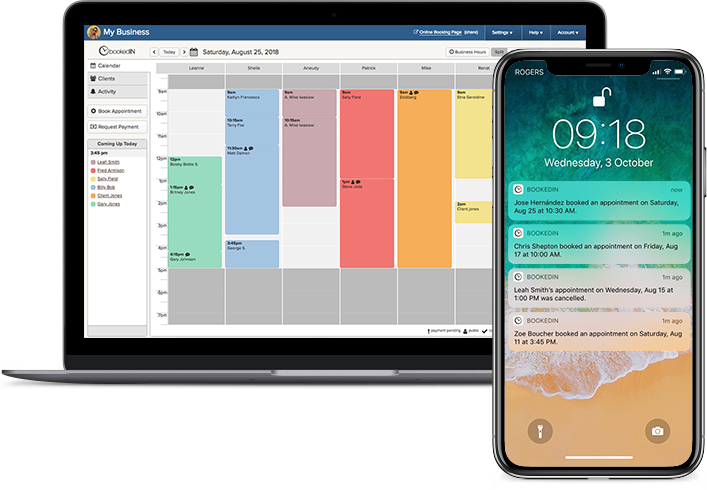
If you’re running a multi-artist studio (or you plan to open one), your scheduling tool has to be able to properly handle more than one service provider calendar at a time.
Each artist must have their own bookable time slots and specific set of services (if needed), while clients can choose who they want to book the right person — all without double-bookings or accidental overlaps.
It’s also a big plus if each artist can have their own booking link to share on their social media page, while everything still routes into the correct calendar automatically.
Lastly, the scheduler should let you provide individual log-ins and access permissions for multiple staff members. This makes it easy for select employees to manage client bookings or handle payments while you (or whoever’s in charge) can still monitor everything.
Without team-friendly scheduling, you’ll end up doing a lot of manual coordination, which is exactly what booking software is supposed to reduce. Even if you’re solo now, picking something that can scale later can save you a painful switch.
Get a free demo of Bookedin features
9. Buffer times and other scheduling controls
A lot goes into an appointment beyond the actual tattooing process. There’s also the setup, stencil placement, cleanup, photos, and sometimes a breather in the middle.
That’s why it’s important your booking app lets you build in buffer time before and after appointments, so clients aren’t stacked back-to-back with no room for the tattoo artist to reset.
You should also be able to block off break hours for each tattoo artist, so those times don’t show up to clients as available slots.
Another big one is booking cutoffs, which lets you add a certain amount of lead time for each service, and stops clients from booking an appointment too close to the start time.
These small controls are what ensure your tattoo studio’s schedule is realistic and manageable, even on busy days.
10. A polished, credible booking page
Your booking page is essentially your front desk online, so it needs to look professional and well-organized.
If the page looks generic or cluttered, clients tend to hesitate, especially first-timers may already be nervous about getting a tattoo. Your goal should be for clients (whether new ones or regulars) to feel confident about booking with your studio.
As such, your tattoo appointment scheduling tool should let you add basic branding to your booking page, such as your studio’s logo and brand colors.
Make sure you also have the option to label and describe each service clearly and exactly how you want, so that clients can easily understand it and will know what to expect.
11. Automatic and customizable client reminders
Sending out appointment reminders (whether via email or text messages) is a great way to prevent no-shows and last-minute cancellations, as well as to ensure clients show up prepared.
When it comes to tattoo studios, the flexibility to tweak those reminders matters because different appointment types come with different expectations. For instance, a consultation reminder doesn’t need the same info as a long session.
Either way, you want messages that say more than just “You’re booked!” They should also repeat important details, such as:
- Your shop location
- The appointment start and end time
- Parking notes
- Deposit or policy reminders
- Any prep instructions (e.g., eat beforehand, bring a valid ID)
- Reschedule or cancel link (if applicable)
The best tattoo booking apps also let you automate these reminders and send up to three per appointment, so you don’t need to allot time for extra admin work just to keep clients informed.
Also read: What To Say to No-Show Clients (Including Message Templates!)
12. Easy rescheduling within your rules
It’s definitely normal when a client needs to reschedule, but it shouldn’t lead to endless back-and-forth or a messy calendar with random gaps.
With the right tattoo booking app, clients can reschedule on their own within the rules you set, and your availability updates automatically so you’re not manually moving pieces around.
This is especially important when you’re blocking off time for an hours-long session, since one last-minute shift can throw off your whole week.
Ideally, you can set a rescheduling cutoff (like no changes within 24–48 hours) and cap how many times a client can reschedule.
It’s also helpful when the booking app sends automatic confirmations and notifications the moment a change is made, so there’s no confusion about the updated time.
Also read: 6 Best Tattoo Booking Apps for On-the-Go Scheduling
Tattoo Studio Scheduling Made Easier With Bookedin
When it comes to choosing the right tattoo booking app, focus on two things: making booking hassle-free for your clients and keeping your calendar and operations organized.
If you choose a tool with the basics we covered, you’ll definitely spend less time doing admin work and more time doing work that actually grows your tattoo business.
Ready to upgrade your tattoo shop scheduling? Sign up for Bookedin today (if you haven’t already!) and get a free 14-day trial to test out all its amazing features.