Tattoo Appointment Reminder Message Templates You Can Use
If your day is packed with back-to-back tattoo clients, you don’t have time to chase people down or rewrite the same reminder text 20 times. You need fast, clear tattoo appointment reminder message templates that cut no-shows and protect your income.
This guide gives you reminder scripts for texts, email, and social DMs, plus timing tips and policies that actually stick.
Key Takeaways
- Use clear, short reminder templates that confirm time, location, and policies.
- Send at least two reminders: 48 hours and 24 hours before the appointment.
- Always include rescheduling and/or cancellation instructions, plus your no-show policy.
- Automate reminders with tattoo booking software to save time and avoid mistakes.
- Use different templates for new clients, big pieces, and repeat regulars.
Why Appointment Reminder Messages Matter for Tattoo Studios
No-shows and last-minute cancellations hit tattoo artists harder than most service businesses. A single missed session can wipe out a half day of income, waste prep time, and block a spot that a serious client would have taken.
Having clear tattoo appointment reminder templates helps you cut that risk by setting clear expectations before the client ever walks in. A good reminder does more than say “See you tomorrow.” It confirms the design or idea, reminds them about deposits, links to your booking page, and repeats your cancellation rules in plain language.
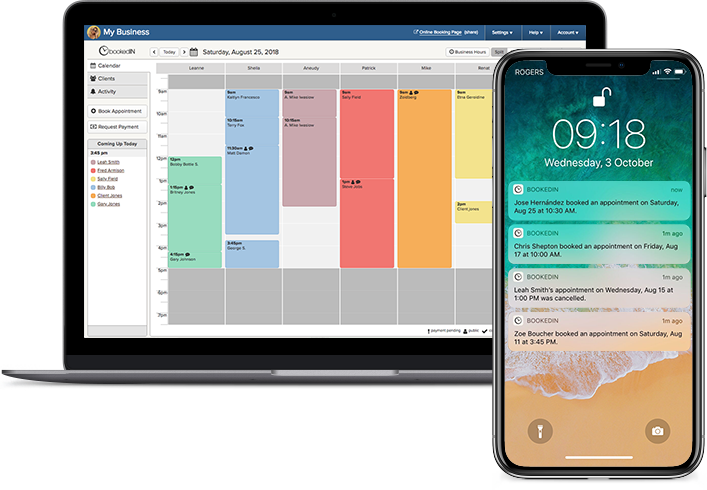
When you use consistent templates, your whole shop sounds professional and on the same page. If you use a tool like a tattoo booking software, you can automate these reminders so they go out like clockwork without you touching your phone.
- No-shows and late cancellations cost serious time and money.
- Strong reminders confirm time, design, and policies.
- Templates keep your whole shop consistent and professional.
- Automation sends reminders without manual texting.
Reminder messages are not just “nice to have.” They are part of your shop’s system to protect your time, keep your calendar full, and train clients to respect your schedule.
Best Practices for Tattoo Appointment Reminder Messages
Before you copy any template, dial in the basics. Every reminder should include the client’s name, date, time, artist, shop address, and how to contact you if they need to change something.
Keep the language simple and direct. Avoid slang that might confuse people or get flagged by carriers.
Always repeat your key policies: deposits, late grace period, and how far in advance they must cancel to avoid fees. For bigger pieces or first sessions, add prep instructions like “eat beforehand,” “bring ID,” or “avoid alcohol for 24 hours.”
Use the same structure across SMS, email, and DMs so clients always know what to expect. If you use Bookedin, you can build these rules into your reminders and client messages so every booking triggers the right message automatically.
- Include name, date, time, artist, and shop address.
- Repeat deposits and cancellation rules in every reminder.
- Add prep instructions for big or first-time pieces.
- Keep language short, clear, and consistent across channels.
Once these basics are set, your templates will feel natural, protect your policies, and save you from rewriting the same info in every message.
Text Message Reminder Templates You Can Copy
Text reminders work best when they are short, clear, and easy to scan. Most clients will only glance at your message for a second, so put the most important info first: date, time, and what they need to do.
Use their first name so it feels personal, and always include a simple call to action like “Reply C to confirm” or a link to your Booking Page. This makes it easy to track who is locked in and who might flake.
You can also use different tattoo appointment reminder templates for new clients, large pieces, and touch-ups. With Bookedin, you can plug these into your automated reminders so they send at set times without you lifting a finger.
Use the templates as a base, then tweak the tone to match your shop’s style and your own voice. Adjust names, times, and policies as needed.
For a standard reminder:
“Hi [First Name], this is [Artist] from [Shop]. Reminder: your tattoo appointment is [Day, Date] at [Time]. Address: [Address]. Please arrive 10 minutes early. Reply C to confirm or call/text [Number] to reschedule. Late cancellations/no-shows may lose their deposit.”
For first-time clients:
“Hi [First Name], welcome to [Shop]! Your first tattoo with [Artist] is [Day, Date] at [Time]. Bring a valid ID, eat beforehand, and avoid alcohol for 24 hours. Reply C to confirm or R to reschedule.”
Email Reminder Templates for Detailed Info
Email reminders give you more room to explain details that do not fit in a text. Use these for big projects, multi-session pieces, or clients who booked far in advance.
Start with a clear subject line like “Reminder: Tattoo Appointment with [Artist] on [Date]” so it stands out in their inbox.
In the body, repeat the basics: date, time, artist, shop address, parking tips, and your cancellation window.
Then, add a short section for prep: skin care, clothing suggestions, and what to bring. You can also link to your booking page so they can reschedule themselves if needed.
Standard appointment reminder email (simple + clear)
Subject: Reminder: Tattoo appointment on [Day], [Date] at [Time]
Hi [Client name],
Just a quick reminder that you’re booked for a tattoo appointment with [Artist] on [Day], [Date] at [Time].Appointment details
Artist: [Artist]
Location: [Shop name], [Address]
Parking: [Parking tip, if needed]
If you need to reschedule, please use this link: [Reschedule link] (or reply to this email). Our cancellation window is [X hours/days].
See you soon,
[Shop name]
Multi-session reminder email (ties it to the project)
Subject: Reminder: Session [#] for your tattoo on [Date] at [Time]
Hi [Client name],
Quick reminder that your [Project name / tattoo description] is scheduled for Session [#] with [Artist] on [Day], [Date] at [Time].Session details
Session: [#] of [Total sessions, if known]
Focus for this session: [Outline/shading/color/etc.] (optional)
Location: [Shop name], [Address]
Before you come in
Eat beforehand and bring a snack/water if you’d like.
Wear something that makes it easy to access the tattoo area: [Clothing suggestion].
If you have any updated reference images, reply here and include them.
Need to move the appointment? Use this link: [Reschedule link] (or reply to this email). Please note our cancellation policy: [X hours/days notice].
Thanks,
[Shop name]
Policy-heavy reminder email (deposits, late window, ID, etc.)
Subject: Action needed: Confirm your tattoo appointment on [Date] at [Time]
Hi [Client name],
This is a reminder that you’re booked with [Artist] on [Day], [Date] at [Time] at [Shop name]. Please review the details below so everything goes smoothly.Appointment details
Artist: [Artist]
Location: [Address]
Arrive: [X minutes early] (recommended)
Important policies (please read)
Deposit/payment: [Deposit amount] is required by [deadline] to hold your appointment. Pay here: [Payment link].
Late policy: If you arrive more than [X minutes] late, we may need to shorten/reschedule the appointment and [fee/deposit forfeited details].
Cancellation/reschedule: Changes must be made at least [X hours/days] before your appointment to keep your deposit.
ID requirement: Please bring valid photo ID if required.
To confirm or reschedule, use this link: [Confirm/reschedule link]. If you have any questions, reply to this email and we’ll help.
Thanks,
[Shop name]
Reminder Timing: When To Send Messages
Timing matters as much as wording. If you send reminders too early, people forget. Too late, and they cannot adjust work or travel plans.
A solid pattern for most shops is: one confirmation at booking, one reminder 48 hours before, and a final reminder 24 hours before. For high-value or all-day sessions, add a same-morning text.
You can also use your calendar data to see when no-shows tend to happen, then adjust your timing. If your clients often book months ahead, consider a “check-in” reminder one week before so they can flag any issues early.
With Bookedin, you can set these schedules once and let reminders run in the background while you work.
FAQs
How many reminder messages should I send for a tattoo appointment?
Most shops do well with three touches: a confirmation at booking, a reminder 48 hours before, and another 24 hours before. For full-day or large pieces, add a same-morning text. More than that can feel like spam. Fewer than two, and people forget or double-book themselves.
What is the best channel for tattoo appointment reminders: text or email?
Text is best for quick, last-minute reminders because people actually read them. Email works better for long instructions, big projects, and multi-session pieces. Many shops use both: email for details a few days out, then SMS 24 hours before. If you use Bookedin, you can set both to go out automatically.
What should always be included in a tattoo reminder message?
Every reminder should include the client’s name, date, time, artist, shop address, and how to contact you. Add one clear line about deposits and one about your cancellation window. For new clients or big pieces, include ID requirements and basic prep like eating beforehand and avoiding alcohol.
How do I mention my no-show policy without sounding rude?
Keep it short and matter-of-fact. Example: “Cancellations under 24 hours or no-shows may lose the deposit as per our policy.” Use bold text on that line in emails. When this line appears in every reminder, clients see it as a standard rule, not a personal attack.
Can I use the same reminder template for every client?
You can, but it’s better to have a few versions. Use a simple template for small pieces and touch-ups, a more detailed one for first-timers, and a prep-heavy one for large or all-day sessions. This keeps messages relevant without creating extra work, especially if you automate them.
How do reminder templates work with online booking?
When you use online booking tools like Bookedin, every appointment created on your calendar can trigger your saved reminder templates. Clients book through your booking page, get automatic confirmations and reminders, and can reschedule themselves. You set the wording and timing once, then let the system handle the rest.
About the Author

The Bookedin Team is made up of writers, marketers, and people who genuinely understand the day-to-day of running a service business. Our articles cover everything from scheduling and client management to marketing and business growth — because running a service business is no small feat.