Tattoo Studio Software Stack: What Tools You Need & Why
This article breaks down the tattoo studio software stack you actually need to keep everything organized, whether you’re a solo tattoo artist or running a studio.
What a “Software Stack” Means for Tattoo Studios & Why It Matters
A tattoo studio software stack is the set of tools you use to run the full client journey — not just scheduling.
In a tattoo studio, the workflow usually starts with an inquiry, moves into a consult, then a deposit, followed by the appointment, aftercare, and eventually a rebooking.
That said, if your run a tattoo business, your software stack needs to do more than just handle your calendar.
Each of the tools in your tattoo studio software stack should work together to either take on administrative tasks, encourage clients to book, or help ensure clients show up for the appointment.
Booking & Scheduling: Your Stack’s Foundation
It’s important to pick the right software for booking and appointment scheduling, given that everything else in your stack depends on this tool being accurate and consistent.
Tattoo studios often do best with request-to-book when the work needs review (e.g., design complexity, placement, pricing range), while instant booking can work for straightforward services like consultations or small flash pieces.
A good system also lets you set your list of services, durations, and pricing, with buffers for setup/cleanup and breaks so the schedule is realistic.
It should also make it easy to manage services and pricing without constantly updating multiple places or accidentally publishing the wrong information.
Reduce no shows and double booking
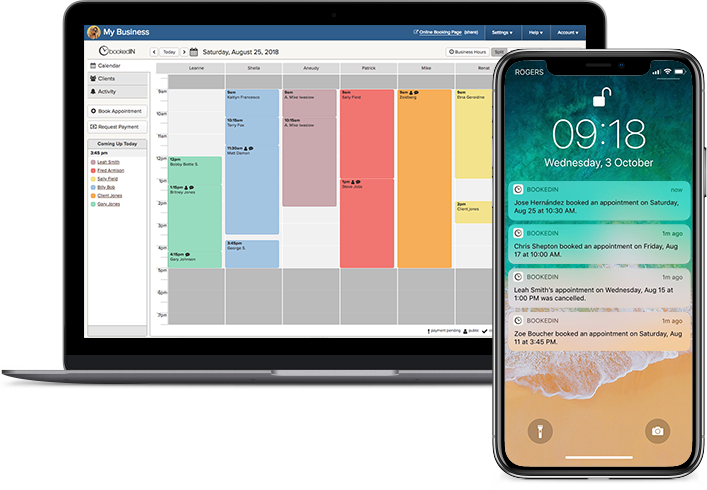
Simple online scheduling tuned for studios.
Ideally, every artist can also have their own booking page (or link) with their availability and policies baked in, so clients book the right thing with the right person without extra back-and-forth.
Meanwhile, automated confirmations and reminders for clients are essential in preventing missed appointments, especially when clients are booking from mobile.
Finally, the booking tool should support clear reschedule/cancellation rules and basic client records (that is, appointment history and notes) so you’re not digging through messages every time someone returns.
Payments: Deposits, Invoices, and In-Studio Checkout
This part of your stack is what helps protect your shop’s time and your income. With deposits upfront and an easy way to take payment in-studio, you spend less time chasing money and deal with fewer no-shows and last-minute changes.
The deposit setup should match how you price work/ Some studios use a flat amount, others use a percentage, and many vary it by service or artist.
Timing matters, too. You might collect a deposit after a consult, when you approve the request, or as soon as a slot is confirmed — what matters is that it’s consistent and tied to your policy.
On appointment day, smooth payment options (tap-to-pay, card payments, invoices/receipts, and simple cash tracking) keep the front desk from becoming a bottleneck.
You’ll also want a clean way to handle refunds, reschedules, and chargebacks, ideally backed by written policies and receipts so there’s less confusion later.
If your shop splits income across artists and the studio, tips and payout splitting are nice extras that are most useful once you’re tracking payouts regularly and want fewer manual calculations at closing.
Forms & Waivers: Paperwork Without the Paper
This layer reduces day-of chaos and makes recordkeeping safer by keeping all the information linked to the right client and the exact appointment — instead of scattered across texts, email threads, or random folders.
At minimum, you want digital consent and waivers with e-signatures and a clear timestamped record so you can prove what was signed and when.
Intake forms help you collect key health details (like allergies, medications, and skin conditions) ahead of time, which helps artists better prepare and prevents last-minute surprises.
Depending on your local requirements, you may also need to capture age verification or store a photo ID, so the studio isn’t relying on memory or screenshots.
Most importantly, every form a client completes should save securely with the right access controls, be easy to pull up later, and automatically attach to that client’s profile and appointment so you’re never hunting for paperwork when you need it.
Preview what this looks like on Bookedin
Operations and Insights: Keeping the Business Side Organized
Once you’ve got booking, payments, and forms in place, the “shop management” part of the stack is what helps everything stay organized as the studio gets busier or adds more artists.
It starts with permissions and roles, so your shop manager, front desk staff, and artists can each access and do what they need to — without giving everyone the same level of control or visibility.
From there, it gives you a cleaner way to run the business side: consistent setup across artists, fewer manual updates, and a clear view into what’s happening without micromanaging.
Reporting is where this layer really pays off: revenue, deposits collected, no-show rate, and rebooking rate tell you what’s working and where you’re losing time or money.
Over time, those numbers also help you answer practical questions, like which services are most profitable, whether deposits are actually cutting no-shows for your studio, and how far out you’re booking for each artist.
If you operate across multiple calendars or locations, you’ll want a setup that can separate views when needed (by artist, room, or location) but still roll everything up into an owner-level overview.
Overall, you should be able to spot problems quickly, stay consistent across the team, and make decisions based on what’s happening in the shop — not what you think is happening.

Stop losing time in your messages
Let clients pick a time and confirm instantly. Your schedule stays full and your inbox stays quiet.
- ✓Collect deposits seamlessly
- ✓Automatic reminders
- ✓Calendar sync
- ✓Mobile‑friendly booking
Build a Stack or Use One System: Picking the Right Setup
Mix-and-match tools (sometimes called “best-of-breed”) can be a good fit if you want to pick the strongest option for each part of the workflow: one tool for scheduling, another for payments, another for forms, and so on.
The tradeoff is that these tools have to work together in real life, not just in theory: deposits should reliably trigger confirmations, forms should automatically attach to the right client and appointment, and you shouldn’t be retyping the same details across systems.
If those connections aren’t solid, a mix-and-match setup can quietly create extra admin and more chances for steps to get missed, especially as volume increases.
Meanwhile, an all-in-one platform is the simpler path because booking, deposits, forms, reminders, and client records live in one place, which reduces handoffs and keeps everyone on the same page.
That’s often the easiest choice for solo artists who want less juggling, and it can also be a strong choice for studios that want consistency across multiple artists without building a custom tech setup.
At higher volume, the biggest benefit here is fewer moving parts for front desk staff and fewer “Where did that info go?” moments.
If you want the all-in-one route, Bookedin is designed to keep your entire tattoo studio workflow under one roof.
Get a free trial & explore Bookedin features
About the Author

The Bookedin Team is made up of writers, marketers, and people who genuinely understand the day-to-day of running a service business. Our articles cover everything from scheduling and client management to marketing and business growth — because running a service business is no small feat.