12 Must-Have Apps for Tattoo Artists
As a tattoo artist, having the right tools can save you a lot of time and frustration — and that’s exactly why we put together a list of recommendations for the best apps for tattoo artists.
Some of these will help you draw and refine designs more efficiently, while others will make it easier to stay on top of bookings, payments, client details, and everyday admin.
Best Design & Illustration Apps for Tattoo Artists
Sure, there’s nothing wrong with designing tattoos by pen and paper, but using a few apps can definitely speed up the process and make it easier to create finished-looking designs to show to clients.
Below are the most highly recommended tattoo design and illustration tools, as well as a few resources for creative inspiration and learning.
Tattoo appointment scheduling made 10x easier
Let clients book a time and confirm instantly, while you focus on delivering a great service.
1. Procreate
Procreate is one of the best iPad apps for tattoo artists of varying experience levels, given how it strikes a good balance between power and simplicity.
It gives you the tools you actually need for tattoo work (like layers, selection tools, transform options, and brush customization), without making the whole design process feel overly technical.
That said, it’s especially useful when you’re trying to draw something quickly during a consultation or clean up a custom concept before sending it off for approval.
Another reason Procreate works so well is that it fits naturally into a tablet-based workflow. After all, most artists like being able to draw directly on the screen, move things around with their hands, and make quick revisions without having to sit at a desktop.
2. Adobe Fresco
For tattoo artists who want a little more flexibility in how they draw, Adobe Fresco is the way to go.
What makes it stand out is that it supports both pixel and vector brushes, so you can sketch more freely at first, then tighten things up later with cleaner line work. That can be useful if your design process starts rough and expressive but needs to end up neat and polished.
Even if it’s not the first app every tattoo artist reaches for, it can be a smart addition if you like having more control over how your lines behave and how your artwork scales.
It’s also a good option for artists who already use other Adobe tools and want something that fits into that ecosystem.
3. Clip Studio Paint
If you’re looking for an app that gives you more technical control over your tattoo artwork, Clip Studio Paint is definitely worth considering.
Compared with simpler drawing apps, it gives you a deeper feature set for line work, editing, and layer control. That makes it especially ideal if you create highly detailed designs or want to fine-tune every part of a composition before it becomes a stencil.
It isn’t quite as beginner-friendly as Procreate, so it may not be the best starting point for every tattoo artist. Still, for those who like precision and don’t mind a steeper learning curve, it can be a really strong tool to have in the mix.
Download Clip Studio Paint for iOS or for Android
4. Magic Poser
This one’s a great app to use if you create figure-based designs or want more control over pose, anatomy, and lighting before you start sketching.
Instead of spending forever looking for the right reference image, you can build your own 3D pose and use that as a guide for your design.
Its key features include drag-and-pose 3D human models, customizable scenes, and adjustable lighting — all of which make it especially helpful for larger custom pieces, character work, or compositions where the placement is super important.
Download Magic Poser for iOS or for Android
5. Handy
Handy (or The Handy Art Reference Tool) is a great pick if you want a quick, reliable anatomy reference while drawing a design. It focuses on body placements that many tattoo artists find harder to get right, particularly the hands, heads, and feet.
The app includes rotatable 3D lit hands with a variety of poses, several head types, editable lighting, and a foot model, giving you a faster way to figure out difficult angles and making your sketching process much easier.
Download the Handy app for iOS or for Android
6. InkHunter
With InkHunter, you can let your clients preview tattoo designs on their skin before they commit. After all, it’s common for clients to feel unsure about the placement, size, or how a design will actually look on their body.
The app uses augmented reality to project tattoo designs onto the body, lets users upload their own designs or choose from a gallery, and shows the tattoo from different angles.
That preview feature can then help clients feel more confident about their decision.
It can also work as a visual selling tool for artists, since showing a design directly on the client’s body often makes the idea feel more real than looking at a flat sketch alone.
Download Inkhunter for iOS or for Android
7. Color Hunt
Color Hunt is designed to help tattoo artists choose color combinations that work well together. For instance, you might already know the general vibe you want, but you need a quicker way to narrow down complementary shades.
The app describes itself as a source of hand-picked color palettes for designers and artists, and it lets users browse palettes by mood, color family, and style categories like pastel, vintage, retro, neon, dark, and warm.
Even if you’re not copying a palette directly, this app can help you think through contrast, mood, and balance a little faster — especially for color-heavy pieces, flash sheets, or even branding your own promo graphics.
Apps for Managing Tattoo Bookings & Client Details
Now that we’ve covered design-related apps for tattoo artists, let’s look at the best tools for handling the business side of things and reducing admin work that can eat into your time.
This section includes apps and software for keeping your tattoo business organized — from scheduling and client communication, to storage for important notes and records.
8. Bookedin
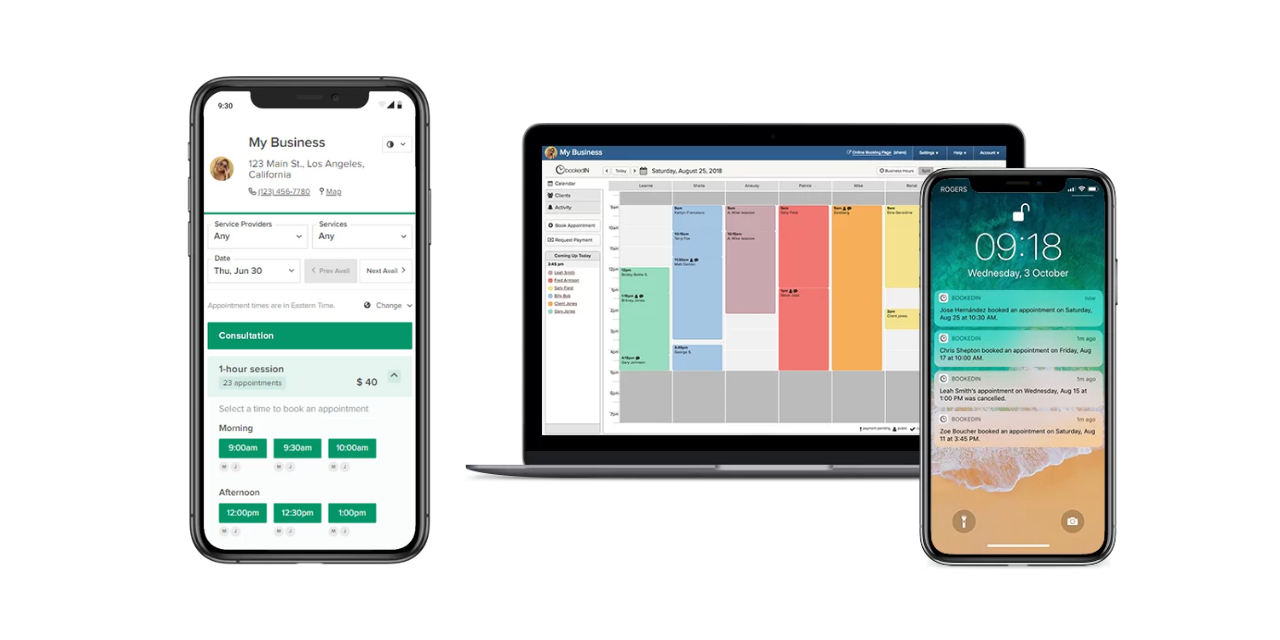
Bookedin is the kind of app that handles the side of tattooing that most artists don’t want to spend all day dealing with. Instead of juggling DMs, manually updating your calendar, or reminding clients to send a deposit, you can move those into one system.
What makes it especially useful for tattoo studios and artists is that it also goes beyond basic scheduling. Tattoo appointments often require extra details before a client even walks through the door, like placement, style notes, and reference images.
Bookedin helps by letting you add custom booking fields, keep track of client details, and collect a deposit to confirm a slot. That said, it’s definitely a great tool for keeping both your schedule and client records organized.
It also gives you the option to screen booking requests, rather than automatically approving every appointment, so you can review the project first and decide which requests fit your schedule, style, and availability.
Try Bookedin for free for 14 days
9. Square
Square is one of the most practical tools a tattoo artist or shop owner can have because it covers the money side of the business without making things overly complicated.
Its point-of-sale system can accept payments, track sales, manage inventory, and support invoicing from the same ecosystem. That makes it ideal for those who want a single system for deposits, in-person checkout, product sales, and general payment processing.
It also includes sales tracking, reporting, and inventory tools, which can give you a clearer picture of what’s selling, what products are running low, and how money is moving through the business.
If you also sell aftercare products, prints, or merch, that kind of visibility can make it easier for you to spot trends and make smarter business decisions.
10. QuickBooks
Bookkeeping is certainly not a fun part of being a tattoo artist. Fortunately, an app like QuickBooks helps keep your finances organized, makes tax season less stressful, and gives you a clearer view of how your business is really doing.
After all, once money starts moving regularly through the business, you need a clearer way to track income, expenses, invoices, and receipts. Otherwise, it becomes very easy to lose sight of what you’re actually earning.
This matters even more for solo artists and owners of smaller studios, where personal and business spending can easily get mixed together if you’re not careful.
11. Google Drive
Tattoo artists deal with a surprising amount of digital material, from reference images and custom sketches to healed photos, client files, and shop paperwork.
With Google Drive, you get a central place to store and organize everything — making your day-to-day work much easier. That way, you can easily access files whether you’re on your phone, tablet, or computer.
It also helps when you need to pull up an old reference or resend a file, as it can keep backups of all your important artwork. Sure, it’s nothing flashy, but it certainly solves a very real problem, wouldn’t you agree?
Download Google Drive for iOS or for Android
12. Dropbox
Dropbox fills a similar role to Google Drive, but some tattoo artists like it better because it’s especially convenient for keeping large artwork folders synced and easy to access across different devices.
That can be helpful if you frequently switch between sketching on a tablet, organizing files on a desktop, and pulling up references on your phone during consultations.
For tattoo artists, this app is quite ideal for keeping flash sheets, stencil-ready files, and visual references all in one tidy archive.
Stop losing time in your messages Let clients pick a time and confirm instantly. Your schedule stays full and your inbox stays quiet.
Get started→
Final Word on the Best Apps for Tattoo Artists
Running a tattoo business takes creativity, skill, and a lot of behind-the-scenes organization. That’s why it helps to have apps or software that support both the artistic side of your work and the practical side of keeping everything on track.
So, if you’ve been feeling bogged down by admin, not-so-organized files, or unnecessary back-and-forth with clients, this might be a good time to upgrade your setup. A few solid tools can go a long way toward making your day-to-day easier.