7 Best Tattoo Booking Software for Small Studios
In most larger tattoo studios, there’s usually someone keeping an eye on the inbox and the calendar. However, in a small studio, it’s usually just one or two people… who are also handling other tasks on top of client messaging and scheduling.
Fortunately, the right appointment booking tool can help take a lot of administrative tasks off your plate.
We’ve rounded up our top picks for the best tattoo booking software for small studios — including those built specifically for tattoo workflows, plus a few flexible schedulers that work great for shops that want to keep things simple.
1. Bookedin – Overall top pick for small tattoo shops

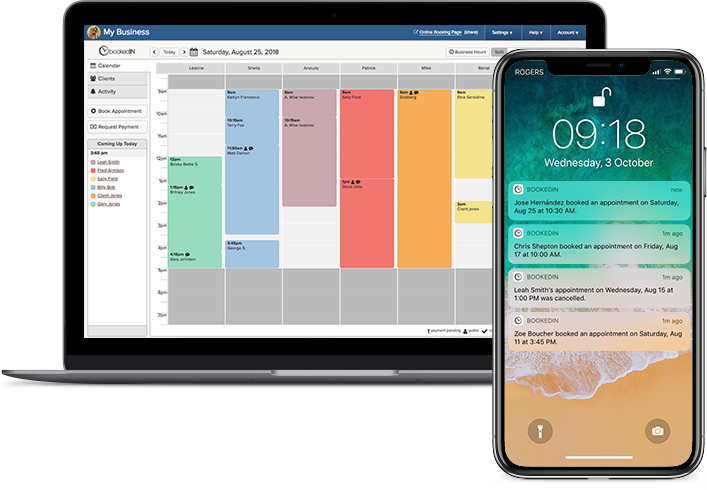
Bookedin is a no-fuss scheduling tool that works especially well for small tattoo studios that want easy, professional online booking without having to work with a complicated system.
It’s packed with super-handy features — all built with the intention of keeping things simple for both those working in tattoo shops and their clients.
Book a free demo to learn more
What it does well:
- Makes it easy for clients to book you online without the back-and-forth: You can share your booking page link anywhere (e.g., your website, Instagram bio, Google Business Profile), and clients can grab a time that actually works with your availability.
- Collects tattoo info up front with custom intake fields: You can ask clients various questions during booking, so you can start the appointment (whether it’s a consultation or actual session) well prepared.
- Helps reduce no-shows with deposits and payment requests: If your studio charges deposits (most do), Bookedin supports taking payment as part of booking or sending payment requests so clients lock in their spot.
- Sends automatic text/email reminders (so you don’t have to): You set it once, and Bookedin handles confirmations and reminders. This is huge for tattoo studios because people forget appointments at times.
- Keeps client history, notes, and files in one place: You can store important details and attach reference images or documents, so you won’t have to look for these next time you need something for that client.
- Works well for small teams with multiple artists: Each artist can have their own availability, Bookedin calendar, and login. You can also control permissions so not everyone has access to everything.
Check out all features & pricing plans
2. Jotform Appointments

Jotform Appointments is a great choice if you want booking to feel more like an application or request process, not just “pick a time.”
This highly customizable tattoo booking software is especially useful when you want clients to submit details and images upfront.
What it does well:
- Collects tattoo details and reference photos before the appointment is booked: This is the biggest win for small tattoo studios. You can build a flow where clients upload reference photos, choose style/placement, answer required questions, and then pick a time.
- Gives you tons of customization without you needing to have tech skills: If you’ve ever thought, “I wish my booking page asked one more question,” Jotform is built for that. You’re not stuck with a rigid template.
- Lets you take payments inside the booking flow: You can set up deposit collection (or full payment) so the client commits at the time they book.
- Syncs with calendars so you don’t double-book yourself: This is extra helpful if artists are juggling Google Calendar, personal calendars, guest spots, conventions, and more.
- Works well if your studio already lives on forms and links: If you’re used to sending “fill this out first” links, this software is basically that, but with scheduling built in.
Also read: How To Open a Tattoo Shop: A Step-by-Step Guide for Beginners
3. Square Appointments

If your studio already uses Square for payments and point-of-sale, then its scheduler, Square Appointments, might be the most logical pick for you.
After all, keeping scheduling and payments under one roof can help further simplify deposits and checkout.
What it does well:
- Combines scheduling and payments in one ecosystem. If your studio already uses Square for deposits, POS, or invoicing, Square Appointments can feel like the simplest “all-in-one” move.
- Makes it easy to set up an online booking page fast. You don’t need a fancy website to start — you can get a working booking flow up quickly and share the link.
- Works well for multi-artist studios. Clients can book with a specific artist (or choose “any available”), and each artist can have their own schedule.
- Keeps services/staff availability updated in real time. That means fewer “Wait, I thought you were free then?” moments.
- Good for no-show prevention when paired with payment rules. Studios that require deposits often prefer keeping everything inside the same payment system they already trust.
4. InkDesk

InkDesk is tattoo-specific and leans heavily into reducing the admin load that happens around scheduling — especially messages and inquiries.
That said, if you want a more organized client communication workflow (i.e., managing requests and keeping details straight), it’s definitely worth a look.
What it does well:
- Keeps booking and client communication together: A lot of tattoo admin pain isn’t scheduling — it’s the inbox. InkDesk is built to help you keep inquiries, details, and replies organized.
- Saves time with templates for common replies: This includes pricing explanations, consultation instructions, what to bring, and aftercare basics. So, yes, you can stop retyping the same messages every day.
- Keeps reference images and details attached to the conversation: Instead of hunting through DMs for that one screenshot, it’s stored with the client thread.
- Uses booking forms to collect details before you commit to a slot: This is great for studios that want to screen requests (based on style match, placement, budget, timeline, etc.) before confirming an appointment.
5. Acuity Scheduling

Want more control over how appointments happen — especially rules, limits, and consult-first workflows? Acuity Scheduling might be the tattoo booking tool for you.
It’s popular among service businesses that prefer more structure and customization options, without having to deal with an overly complicated setup.
What it does well:
- Gives you strong scheduling rules and control: Want to require a consult first? Add buffer time between appointments? Limit how far in advance someone can book? Acuity is great for that.
- Lets clients reschedule or cancel on their own (with your boundaries): This saves your studio time, and you can still set rules like minimum notice periods.
- Collects intake info and builds client profiles automatically: Over time, it creates a “paper trail” of what clients submitted and booked, which helps with repeat sessions.
- Handles reminders and follow-ups automatically: You can set it so clients get confirmation, reminders, and even post-appointment messages without you lifting a finger.
6. Booksy

Beyond just being a scheduler, Booksy also functions as a platform clients browse to find services.
That said, if your goal is to get more new clients without having to switch outside your booking platform, then this might be the way to go.
What it does well:
- Helps people discover your studio through a marketplace: This app provides a way for new clients to find you without you having to rely only on social media and ads.
- Convenient for clients who like managing all their appointments in one app: Booksy lets them book and keep track of different services (including tattoos) in a single spot, which can mean less friction and fewer dropped bookings.
- Keeps booking payments and checkout in one place: Clients can pay a deposit when they book, and you can take the final payment in person without switching tools.
- Lets you add buffer time between appointments: You can build in extra minutes for setup, stencil placement, cleanup, and those quick consult chats that always happen.
7. Vagaro
Vagaro is more of an all-in-one business platform with broader tools, rather than a simple scheduler. It can be a good fit if you like the idea of running multiple parts of your studio (e.g., booking, payments, marketing tools) in one place.
What it does well:
- Gives you an all-in-one platform (booking plus more business tools): It’s not just a calendar. It can cover scheduling, payments, client management, and marketing-style features in one place.
- Offers marketplace-style exposure: Some clients browse platforms to find services. Vagaro leans into that, which can help if you’re trying to get fresh eyes on your studio.
- Handles more “shop management” than most schedulers: Things like broader business tools can be helpful if your studio wants one system instead of a bunch of separate apps.
- Good if you want to grow into it: If your studio is small now but you’re planning to add staff, services, and more structured operations, Vagaro can feel like a longer-term home.
Also read: 7 Common Tattoo Booking Mistakes & How To Prevent Them
Wrapping It Up
If you’re running a small tattoo studio, you don’t need a complicated system to keep things running smoothly. All you need is something truly reliable.
So, when choosing a tattoo booking software, make sure to look for one that keeps your booking process moving along automatically while you’re working. Trust us, it’ll make all the difference!
P.S. — If Bookedin sounds like the right fit, you can try it free for 14 days once you sign up.
Featured image credit: Siednji Leon via Unsplash