Barbershop Appointment Reminder Templates for Text & Email
In this article, we’ll give you barbershop appointment reminder templates you can easily copy, paste, and send. That includes texts for confirmations, 24-hour reminders, and same-day nudges, plus email versions for those who prefer that over text.
Each of these templates is written for barbershops specifically, so you can use them as-is instead of spending your night rewriting something generic (or designed for a different line of work altogether).
Note: If you want reminder templates that cover other service businesses too, we’ve got a more extensive version in our appointment reminder templates guide.
Key Things To Include in a Barbershop Appointment Reminder
Here are a few things your barber appointment reminder text or email must have, so you’re not fielding calls from clients asking about details you could have included in the first place.
- The client’s name: This makes it more likely for your message to actually get read. Most people get a handful of unsolicited texts and emails a day and tend to delete anything that looks remotely like spam.
- The barber’s name: This especially applies to multi-chair shops. It confirms the client is booked with who they think they’re booked with, and it saves everyone the awkward reshuffle when the client turns up expecting someone else.
- The service: For example, “haircut” and “cut, beard trim and hot towel” are different appointments with different durations and prices. Naming the service gives the client a chance to correct the booking beforehand, in case they made a mistake.
- The date and time: Also, include the day of the week, because most people remember appointments by day, not by date.
- A way to respond: You might not want to ask for confirmation replies, but clients should be able to reschedule or cancel easily (as long as they give enough notice). Give them a booking link or a one-line instruction like “Reply R to reschedule.”
Set your client reminder messages on autopilot
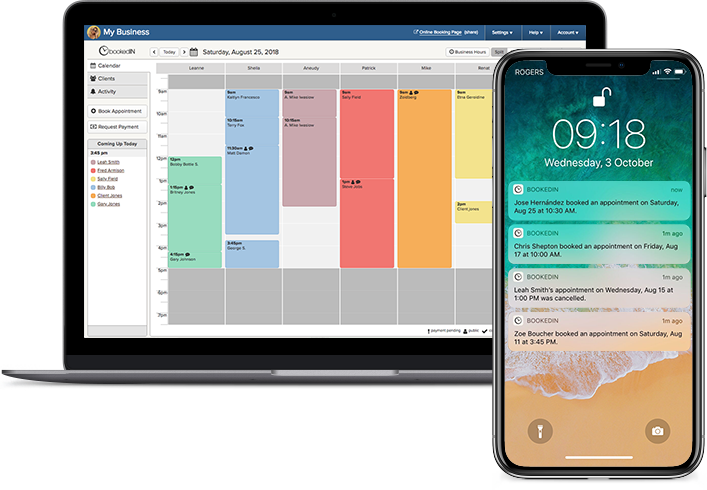
Bookedin sends timed text and email reminders for every booking so clients don't forget.
Barbershop Appointment Reminder Text Templates
You’ll see that every template below uses placeholders in brackets, so make sure to swap those for your barbershop’s details.
Booking confirmation text templates
These texts should go out to the client within minutes after they scheduled an appointment.
Template 1
Hi [Client name], you’re booked with [Barber name] at [Shop name] on [Day, Date] at [Time] for a [Service]. See you then!
Need to make a change? Reschedule here: [Booking link]
Template 2
Hi [Client name]! You’re all set with [Barber name] on [Day, Date] at [Time]. [Service], $[Price].
Your $[deposit amount] deposit is paid and comes off your total at checkout. Balance due in shop: $[Balance].
Reschedule anytime until [rescheduling/cancellation cutoff, if any] here: [Booking link]
Day-before appointment reminder texts
It’s best to send a reminder 24 hours before, so the client has a real chance to tell you if something changed. Also, it gives you a full day to try to fill that empty slot.
Template 1
Hi [Client name]! Reminding you about your appointment with [Barber name] tomorrow ([Day]) at [Time] for a [Service].
Reply YES to confirm, or reschedule before [cutoff] here: [Booking link]
Template 2
Hey [Client name], you’re scheduled for a [Service] tomorrow ([Date]) at [Time] with [Barber name]. Reply YES to confirm.
Need to reschedule? You can do it anytime before [cutoff] here: [Booking link]
Same-day barbershop text reminder templates
Either send these the morning of, or around 10–12 hours before the appointment. Ideally, kept these ones shorter than the previous reminders.
Template 1
Hi [Client name], see you at [Time] [today/tomorrow] with [Barber name]. — [Shop name]
Template 2
Reminder: [Service name] at [Time] [today/tomorrow] with [Barber name]. We’re at [Address].
Come 5 minutes early if you can so we can get started on time. See you soon! — [Shop name]
Barbershop appointment text reminders for first-time clients
We recommend using these for your day-before reminder, since that’s likely when the new client is planning around their appointment — like when to leave, where to park, and if they need to prepare anything (e.g., bring a reference photo, skip washing their hair).
Template for haircut services:
Hi [Client name], reminder for your [Haircut service] with [Barber name] tomorrow at [Time]. If you have a photo of the cut you want, bring it. Come with clean hair and no product in it if you can.
We’re at [Address], and parking is [parking instructions]. We take card and cash, and tips can go on card.
Reply YES to confirm or NO to cancel. Reschedule anytime up to [number of hours] before your appointment: [Booking link]
— [Shop name]
Template for beard trims, lineups, and shaves:
Hi [Client name], your [Beard service] with [Barber name] at [Shop name] is tomorrow at [Time].
Leave your beard as-is until then, no trimming or cleaning up the edges, so [Barber name] has the full shape to work with.
We’re at [Address], and parking is [parking instructions].
Reply YES to confirm, or reschedule anytime before [cutoff] here: [Booking link]
Reminders for longer or higher-priced services
A client missing a two-hour grooming package or a color appointment wrecks your day, because that’s a block you can’t fill on short notice with a walk-in.
So, make sure to send one of these about a week out, on top of your usual reminders.
Hi [Client name], you’re booked at [Shop name] for [Service/s] on [Day, Date] at [Time].
Set aside about [X] hours for this one, so you’re not rushing out mid-service.
Your [deposit amount or percentage] deposit holds the slot and comes off your total. You can reschedule or cancel up to [cutoff] before your appointment, and after that the deposit isn’t refundable.
View or change your booking here: [Booking link]
Barbershop Appointment Reminder Email Templates
It’s good to send out email reminders too, even if text is your main channel. Some clients never reply to texts; others might change numbers without telling you. There might also be times when you’ve got more to say than a single text can hold.
You can use the templates below either on their own or alongside your text reminders to clients.
Booking confirmation email template
Subject: Your [Day, Date] appointment at [Shop name] is confirmed
Hi [Client name],
You’re booked in with [Barber name] at [Shop name].
- Service: [Service]
- When: [Day, Date] at [Time]
- Where: [Address]
- Total: $[Price]
We’ll also text you a reminder the day before. If you need to reschedule or cancel, you can do it up to [cutoff date and time] before your appointment: [Booking link]
See you soon,
[Shop name]
24-hour appointment reminder email template
Subject: Reminder: [Service name] tomorrow at [Time]
Hi [Client name],
Quick reminder that you’re in with [Barber name] tomorrow, [Day, Date], at [Time] for a [Service].
A few things worth knowing before you come in:
- [Prep instructions, if any — such as coming in with clean, dry hair or bringing a photo reference]
- Try to arrive about five minutes early so [Barber name] can start on time. If you’re running late, text us at [Phone number] and we’ll let you know whether we can still fit you in.
- We’re at [Address].
- Parking is [parking details/instructions], and the entrance is [entrance details/instructions].
- Want to add anything to your appointment, like a [Extra service 1] and a [Extra service 2]? Reply today so we can set aside the extra time.
- We take card and cash, and tips can go on the card.
- If that time no longer works, you can reschedule or cancel here: [Booking link]. We ask for [amount of hours] notice so we can offer the slot to someone else.
Any questions before tomorrow, just reply to this email or text us at [Phone number].
See you tomorrow,
[Shop name]
Barbershop appointment reminder email for new clients
Subject: Your first visit to [Shop name] | What to know
Hi [Client name],
Thanks for booking with us. Here’s everything you need for your [Service] on [Day, Date] at [Time] with [Barber name].
Finding us: We’re at [Address]. [Any parking or entrance details].
How long it takes: Your [Service] appointment runs about [X] [minutes/hours], so give yourself a bit of room either side.
Before you come in: Bring a photo if you’ve got a specific cut in mind, and come with clean hair and no product in it. It makes a real difference to what [Barber name] can see and work with.
Paying: We take card and cash, and tips can go on the card.
If plans change: You can reschedule or cancel here up to [cutoff] beforehand: [Booking link]
Got any questions before then? Just reply to this email or text us at [Phone number].
[Shop name]
Appointment reschedule confirmation email
Send this whenever a client moves their appointment, whether they did it themselves or called the shop.
The old schedule is often still in the client’s calendar and the original confirmation is still in their inbox, so spell out the newly updated details clearly to prevent any mixups.
Subject: Updated: Your appointment is now [Day, Date] at [Time]
Hi [Client name],
Your [Service] appointment with [Barber name] has been moved to [Day, Date] at [Time].
If that’s not the time you asked for, reply here or text us at [Phone number] and we’ll fix it.
Your original appointment on [previous day and time] has been canceled, so make sure to update your calendar.
See you then,
[Shop name]
Automate Your Barbershop’s Client Reminders With Bookedin
Having templates won’t save you much time if you still have to send appointment reminders manually each time. Copy-pasting the same text or email to multiple clients still costs you time you probably don’t have after a full day on your feet.
That’s the part Bookedin handles. You can set up a confirmation to go out the moment a client books through your page, then have the other reminders follow automatically. Each message fills in that client’s booking details, so it doesn’t read like a generic blast.
Bookedin also helps with the no-shows that appointment reminders alone don’t prevent. You can require a deposit at booking, which is worth doing for the long services that are hardest to refill when someone drops out.
Also, clients can reschedule themselves through your booking page (as long as it’s inside your cancellation window), instead of calling the shop while you and your team are busy.
Once those are all set up, your barbershop schedule mostly runs itself.

Easiest way to manage your barbershop appointments
Everything you need to run your schedule in one place.
- ✓ Take deposits
- ✓ Automatic reminders
- ✓ Calendar sync
- ✓ Mobile-friendly booking
Barbershop Appointment Reminders FAQ
About the Author

The Bookedin Team is made up of writers, marketers, and people who genuinely understand the day-to-day of running a service business. Our articles cover everything from scheduling and client management to marketing and business growth — because running a service business is no small feat.