How To Get More Google Reviews for Your Service Business
Some people decide whether to book you by going through your Google reviews, comparing your business to your competitors’ based on what previous clients had to say.
So, if you don’t have enough reviews that reflect how good your services actually are, that’s a problem worth fixing ASAP.
Fortunately, the usual reason is not that your clients are unhappy. It’s that most satisfied clients don’t think to leave a review unless you ask them to, mainly because it slipped their mind (whereas it’s the other way around for frustrated clients).
That’s why we put together this guide on how to get more Google reviews consistently without being awkward or breaking any rules.
Note: This article is about getting new reviews for your Google Business Profile. If negative reviews are what you’re dealing with, we have a separate guide for that here.
Why Google Reviews Matter So Much for Service Businesses
Customer or client reviews aren’t just a nice-to-have anymore. They’re the first thing most people check, and they’ve quietly become the deciding factor in whether someone picks your business.
In fact, a study showed that 97% of consumers read online reviews before choosing a local business.
Additionally, when it comes to where most people check for reviews, Google is the clear winner. Around 71% of consumers rely on Google specifically for reviews.
So while it’s good to have a presence on other platforms like Yelp, Facebook, and Instagram, your Google reviews are the ones doing the heavy lifting. That’s exactly why it’s worth focusing your effort there.
But having constant positive reviews on Google doesn’t just make you look trustworthy once someone finds you. It also helps people find you in the first place, and it improves your odds of showing up before your competitors do.
That’s because Google factors reviews into local search rankings, which is why the businesses that appear first on search results tend to have significantly more reviews and a steady stream of new ones coming in.
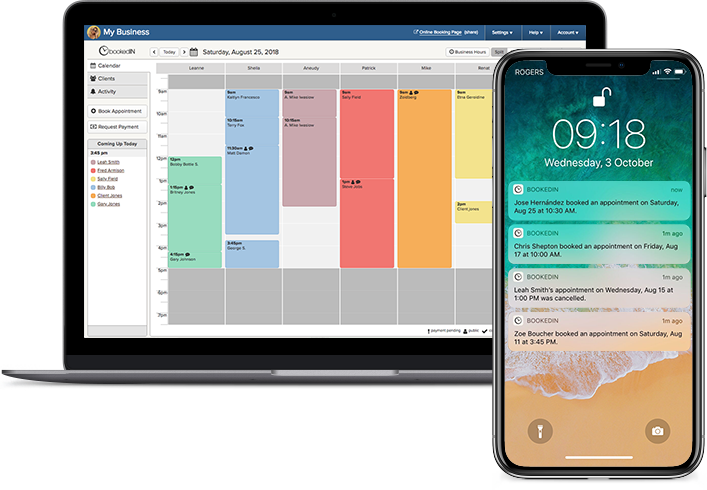
A client scheduling app that does the heavy lifting for you
With tools like automated client reminders, calendar syncing, payment collection, and more.
5 Tips for How To Get More Google Reviews Consistently
As mentioned above, most of your happy clients simply need a nudge to leave a Google review. The important thing here is that you stop worrying that asking comes off as pushy and treat it as a normal part of good service.
Below are five tactics that actually move the needle:
1. Just ask every time, right after a session or appointment
Always remember that the best moment to ask a happy client for a Google review is toward the end of their visit, while the experience is still fresh in their mind.
A client who just walked out with a haircut they love or a tattoo they’ve been planning for months is in exactly the right frame of mind. If you wait too long, that enthusiasm might have worn off, and they’re less likely to get around to it.
Asking for a Google review should feel like part of wrapping up, not a favor you’re hesitant to ask for. Saying something as simple as “If you’ve got a sec, a quick Google review really helps us out” (while the client is paying) is usually enough.
2. Ensure your Google review link is easy to find and use
Even a client who fully intends to leave a review might give up if the whole process is a hassle.
For instance, if you ask them to Google your business, scroll to the right spot, and figure out where to click, you’ve turned a quick favor into a chore. Your goal should be to get them to the review page in as few taps as possible.
Start by grabbing your Google review short link. Google gives you one you can copy straight from your Business Profile. Then, put that short link everywhere clients already are — like your post-visit messages, website, and social media.
You can also turn this link into a QR code that you print on small cards handed out to clients as they leave, so they can scan it later on their own time.
3. Send clients a follow-up text or email
Some clients end up forgetting to leave a Google review the moment they leave because they have other things on their plate. That’s why it’s good to send them a short follow-up message a day or two later.
Keep it brief and friendly: a quick thank-you, a line about how much reviews help a small business like yours, and the direct link. That’s it! However, remembering to send this message each time can be hard when you’re also busy.
Good thing Bookedin can easily do that task for you. You can set up an automated post-visit email once, include your Google review link, and it goes out automatically after every visit.
Schedule a free demo to learn more
4. Train your staff to ask consistently, too
If you have other people at your shop attending to clients, they should also be doing their part in helping the business get more Google reviews. After all, every appointment or session they handle is an opportunity to ask clients for a review.
So, give your team one simple, natural line they can use at checkout so it’s consistent, no matter who the client booked with. Practice it in a quick team huddle if you need to.
The goal is for Google review requests to become a normal habit across the whole shop, not something that depends on whether the owner happens to be at the front.
You can even incentivize your staff, like a group reward when the shop reaches its target number of Google reviews that month.
5. Give clients an experience worth reviewing
People tend to reach for their phones to write a detailed review when something genuinely stood out, good or bad. If the visit was fine but forgettable, you’ll likely get a lot of one-liners.
The reviews that actually convince a potential client to book are the ones with specifics, and specifics come from moments worth mentioning.
You don’t need grand gestures here either. More often, it’s the small things clients would notice — such as nailing the exact result they asked for, a thoughtful finishing touch, or someone checking in to make sure they were comfortable.
Also read: How To Keep Customers Happy: A Guide for Service Business Owners
How To Ask for Reviews Without Breaking Google’s Rules
The part that plenty of review advice miss is that Google has tightened its review policies recently, and some once-common tactics aren’t allowed anymore.
Using such tactics can get your reviews taken down, so it helps to know the rules before you start asking clients for reviews.
- Never offer anything in exchange for a review: You can’t give clients a discount, freebie, loyalty points, or any other perk in return for leaving a Google review. It doesn’t matter whether you ask for a positive review or just an honest one — Google bans incentives regardless of the sentiment.
- Don’t tell clients what to write: This means you can’t ask them to mention a specific staff member by name, encourage particular wording, or request a specific star rating.
- Don’t make clients do their review on the spot: It’s fine to ask them as their session wraps up. What’s not allowed is pressuring someone to do it then and there, like handing them your tablet at checkout or setting up a “scan this before you go” kiosk at the front desk.
So, if any of these no-nos are still part of how you currently ask clients for Google reviews, now’s the time to adjust. A few small changes today can save you from losing reviews down the line.

Never forget to ask for a review again
One quick setup, and clients automatically get a follow-up email with a review link after each visit.
Scripts You Can Use When Asking for a Google Review
Not sure what you should say exactly? Here are some scripts you can borrow for various situations.
Notice that none of these ask for a specific rating or tell the client what to write; they just invite honest feedback, which keeps you on the right side of Google’s rules.
In person, at the end of the client’s session or visit:
- “If you’ve got a minute later, a quick Google review really helps us out. No pressure at all.”
- “We’re a small shop, so reviews on Google make a big difference for us. If you’ve got a sec, I’d really appreciate one.”
Follow-up text:
- “Thanks again for coming in, [Client’s Name]! If you have a moment, we’d love to hear how it went: [link to your Google review page]”
- “Hi [Client’s Name], hope you’re loving the results! A quick Google review would mean a lot to us if you’ve got a minute: [link to your Google review page]”
Follow-up email:
Subject: Thanks for visiting [Business Name]
Hi [Client’s Name],
Thanks so much for coming in. It was great having you, and we hope you’re happy with how everything turned out.
If you have a minute, we’d really appreciate an honest review on Google. It helps other people find us and tells us how we’re doing. You can leave one here: [link to your Google review page]
Thanks again,
[Your Name / Business Name]
Keep your business organized & booked solid
Everything you need to manage your schedule in one place.
- ✓ Take deposits
- ✓ Automatic reminders
- ✓ Calendar sync
- ✓ Mobile-friendly booking
FAQ About Getting More Google Reviews for Your Business
About the Author

With over a decade of experience across startups, online publications, and agencies, Marcy is all about delivering content that connects brands with the audiences they're trying to reach.